

How to Create and Manage an AWS VPC with the CLI or Web Application
This how-to assumes:
- Basic familiarity with System Initiative
- Are familiar with AWS VPC
It will teach you how to create a best practice AWS VPC and manage it with System Initiative.
We will cover:
- The creation of a highly available VPC that spans multiple availability zones.
- A VPC configured with public and private subnets.
- The networking required to allow outbound traffic for resources on the private subnets.
- The networking required for the communication with the internet.
What it will look like when completed
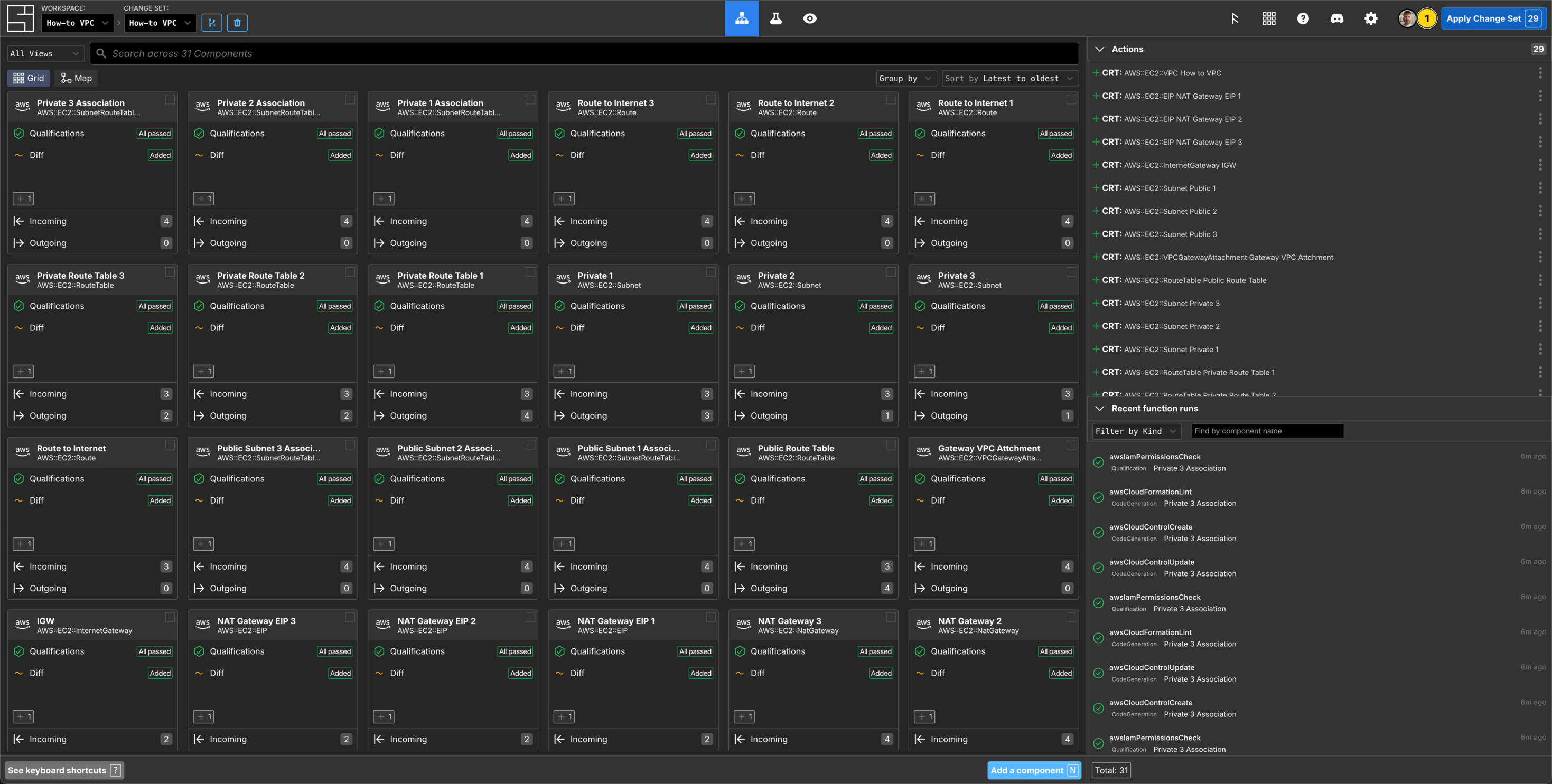
When you have completed this guide, you should have Components that look like this in your Grid:
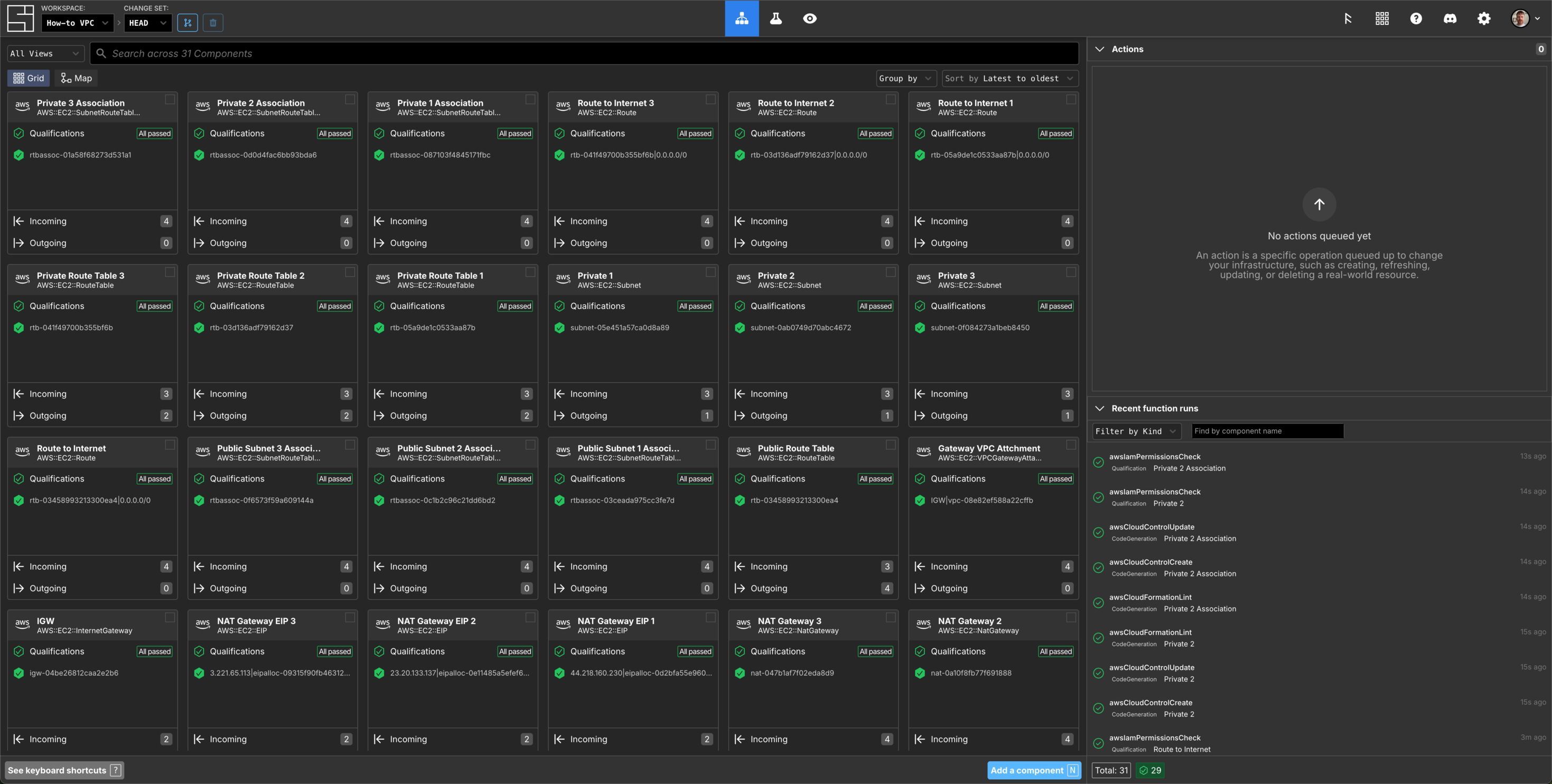
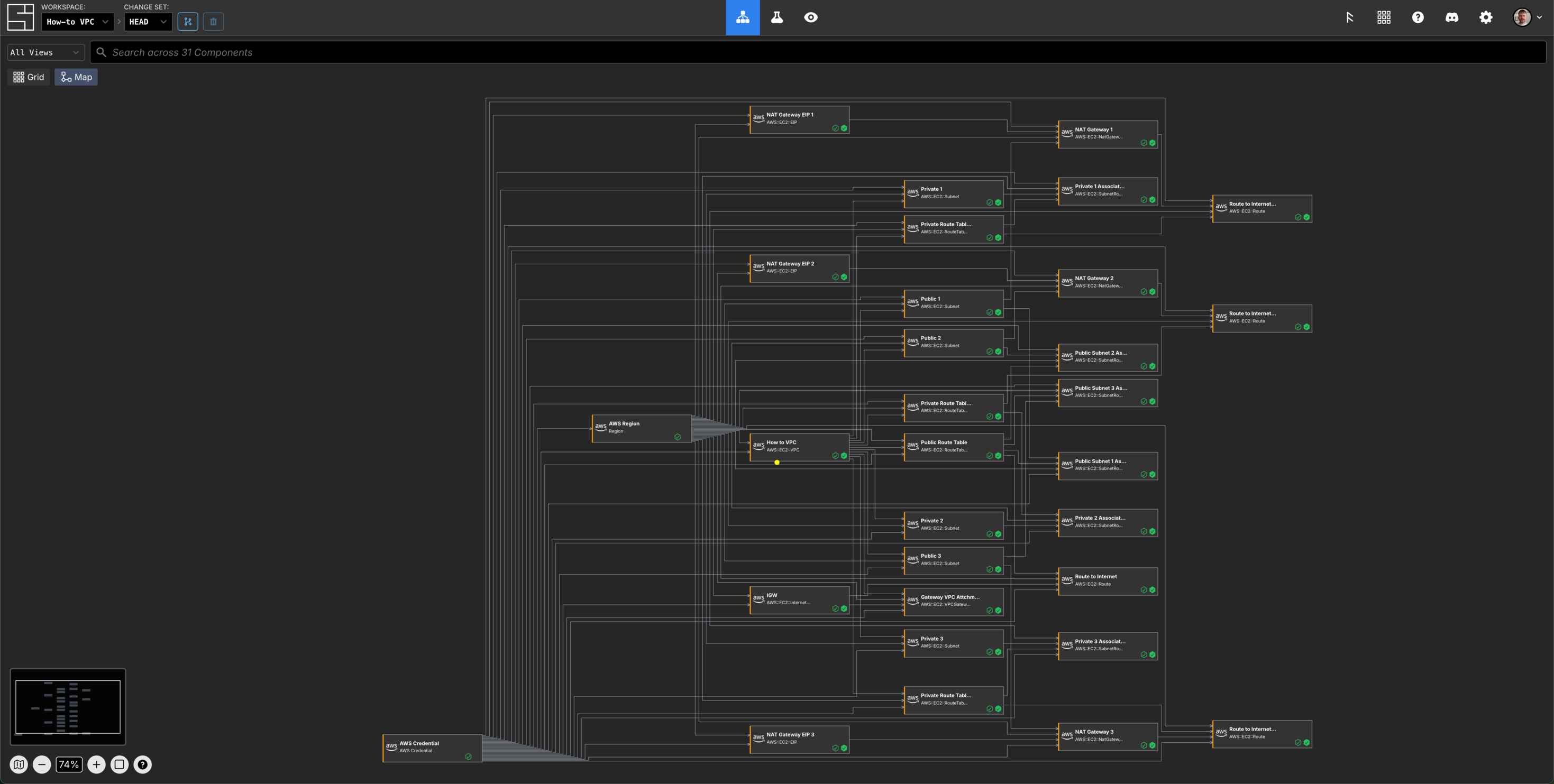
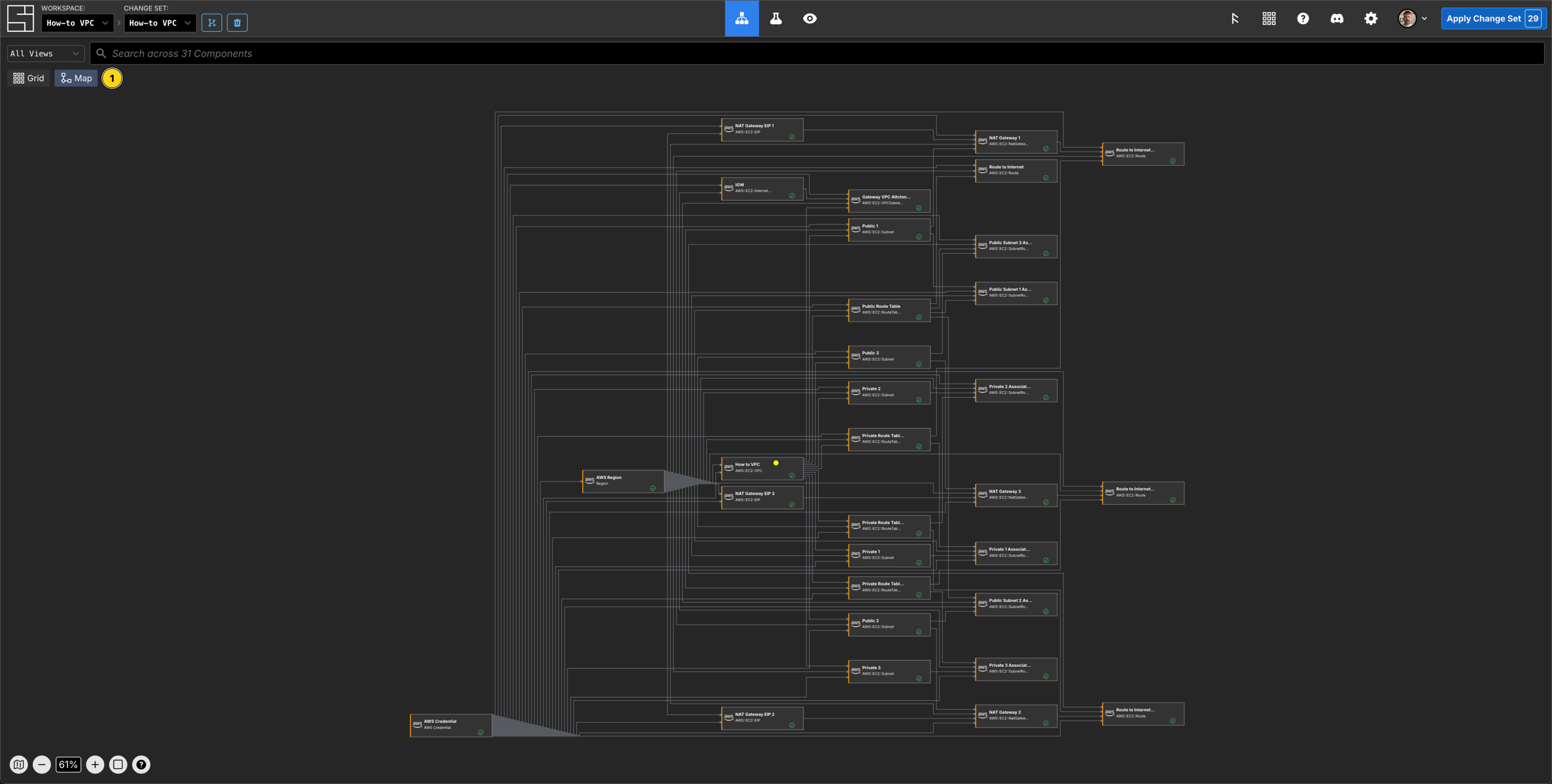
and like this in your Map:
Create a Change Set
First, create a change set: [reference]
$ si change-set create "How-to VPC"
✨ info    si              Change set created: { id: "01KCMGWWD388NJ2DH6KQPXYEG8", name: "How-to VPC", status: "Open" }
$ export SI_CHANGE_SET_ID=01KCMGWWD388NJ2DH6KQPXYEG8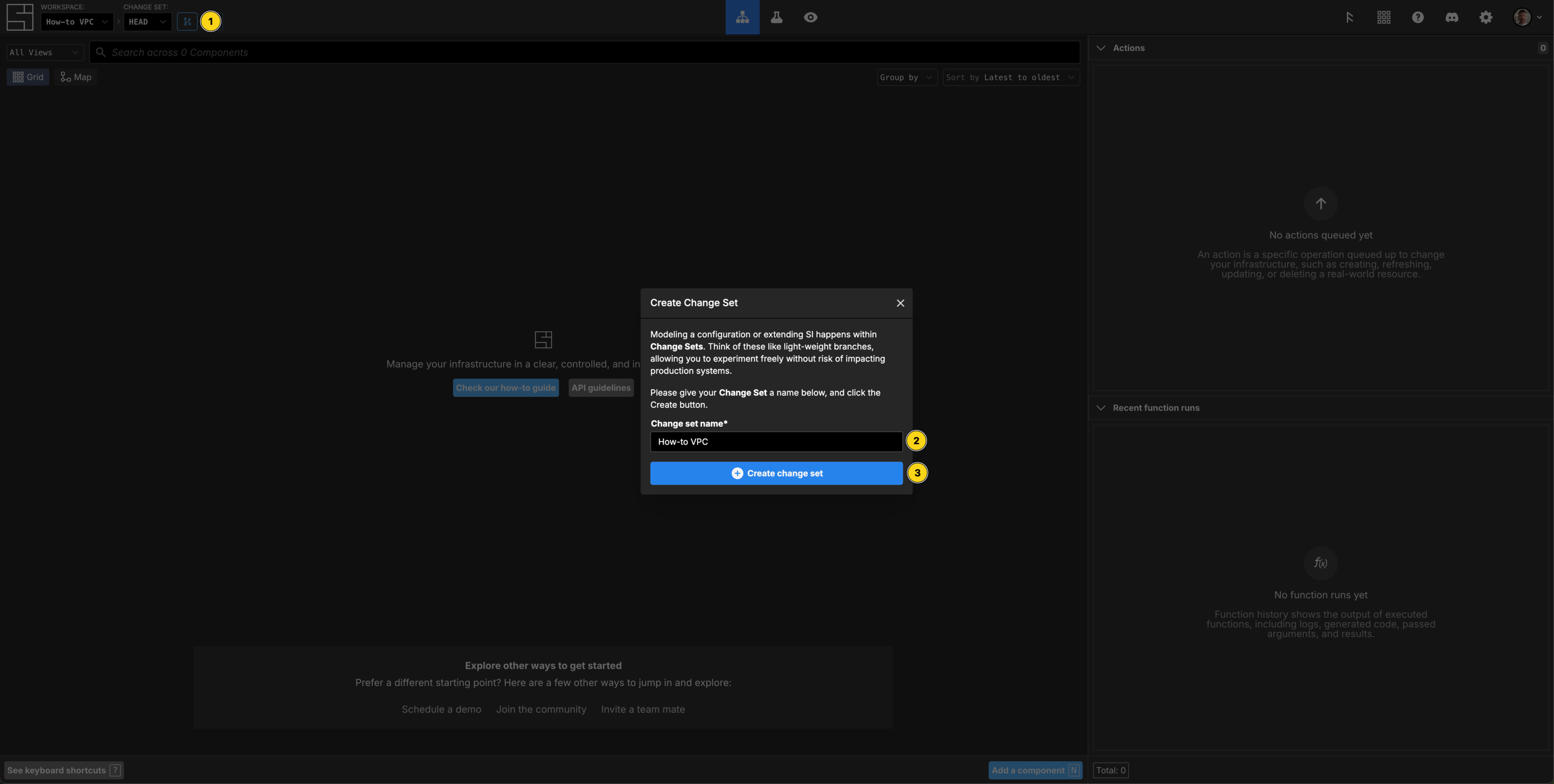
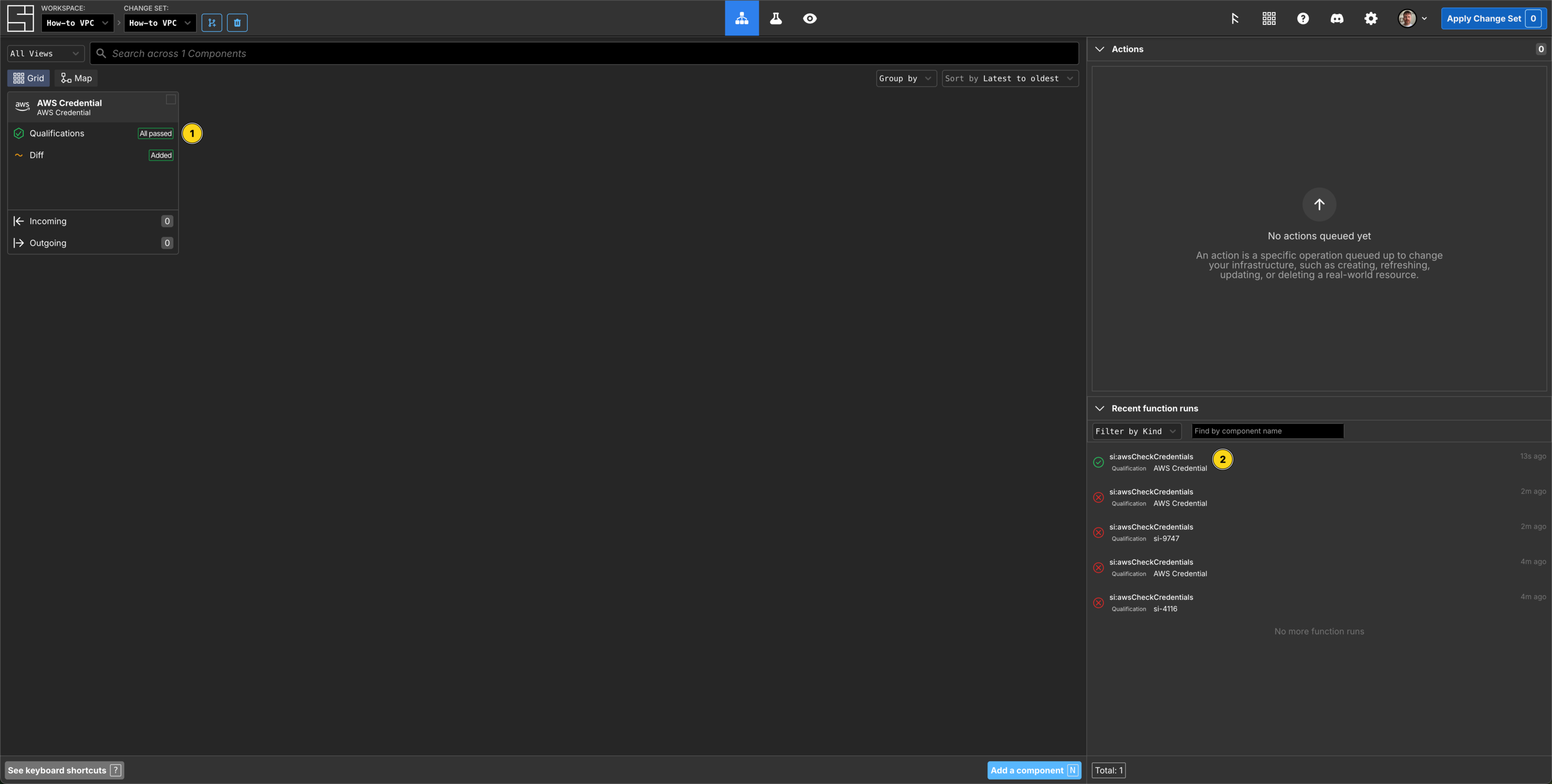
Create AWS Credentials
$ si secret create "AWS Credential" --name "aws-credential-dev" --use-local-profile -c $SI_CHANGE_SET_ID
✨ info    si              Secret type "AWS Credential" not found. Attempting to install...
✨ info    si              Found schema "AWS Credential", installing...
✨ info    si              ✓ Successfully installed "AWS Credential" schema
✨ info    si              Re-querying secret definitions...
✨ info    si              Discovering credentials from local environment...
✨ info    si              ✓ Found 3 credential(s) in local environment
✨ info    si
✨ info    si              Creating AWS Credential component "aws-credential-dev"...
✨ info    si              ✓ Component created with ID: 01KCMKRVATDC6Y3XZNRGMKVDP5
✨ info    si              Creating secret data...
✨ info    si              ✓ Secret created with ID: 01KCMKRVYHRXY7JFK26SYMX155
✨ info    si              Attaching secret to component...
✨ info    si              ✓ Secret attached to component
✨ info    si
✨ info    si              ✓ Credential created successfully!
✨ info    si                Component ID: 01KCMKRVATDC6Y3XZNRGMKVDP5
✨ info    si                Secret ID: 01KCMKRVYHRXY7JFK26SYMX155
✨ info    si                Secret Name: aws-credential-dev
✨ info    si                Change Set ID: 01KCMGWWD388NJ2DH6KQPXYEG8
✨ info    si
✨ info    si              Next steps:
✨ info    si                1. Apply the change set to make the credential available
✨ info    si                2. Other components can now use this credential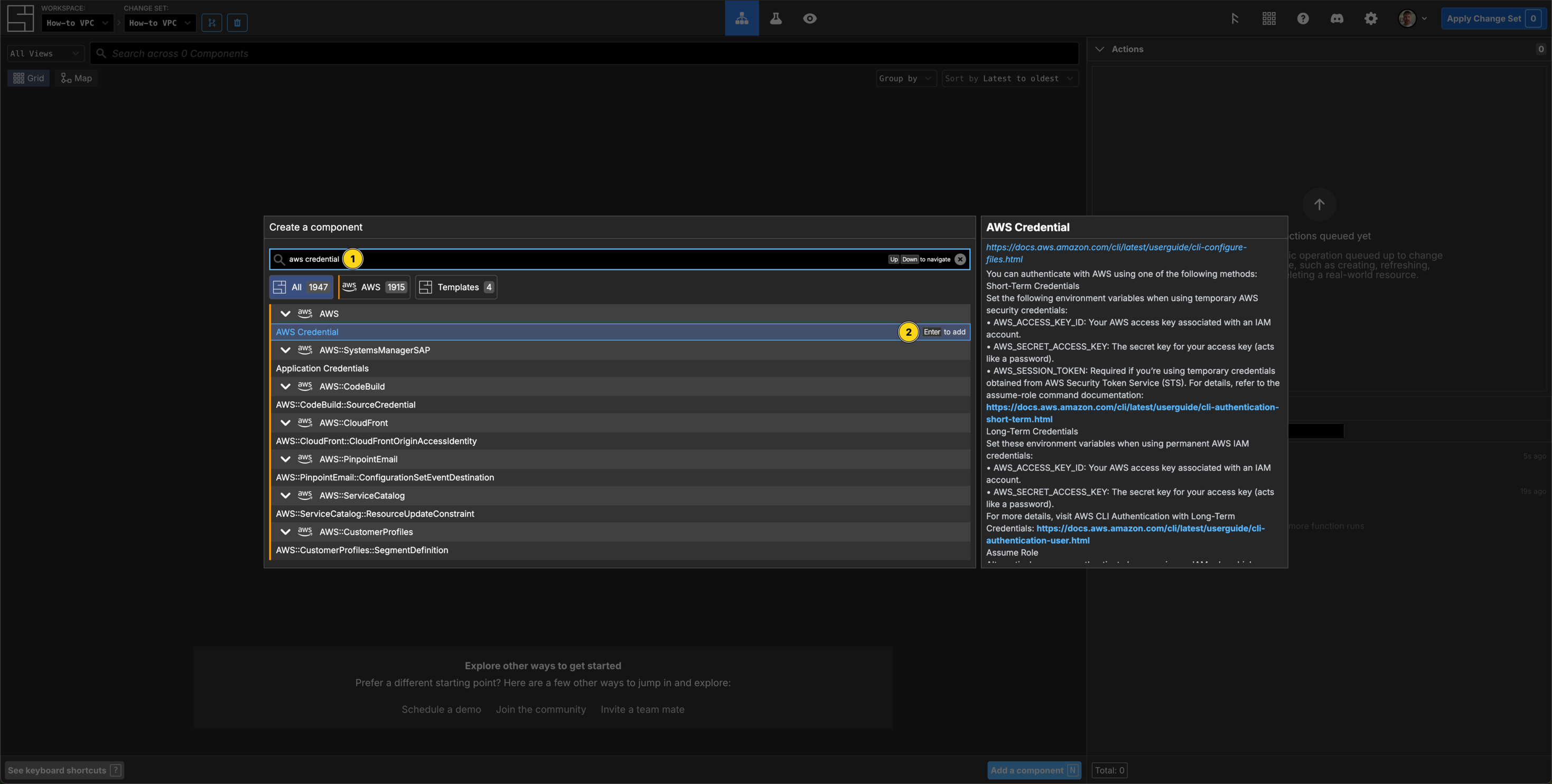
Select an AWS Region
$ cat > component.json <<'EOF'
{
  "schemaName": "Region",
  "attributes": {
    "/si/name": "How to Region",
    "/domain/region": "us-east-1",
    "/secrets/credential": { "$source": { "component": "aws-credential-dev", "path": "/secrets/AWS Credential" } }
  }
}
EOF

$ si component create -c $SI_CHANGE_SET_ID component.json
✨ info    si              Loading component data from "component.json"
✨ info    si              Creating component: "Region" "us-east-1"
Component ID: 01KCMSAE7PFY34B1AYNBXYDKWB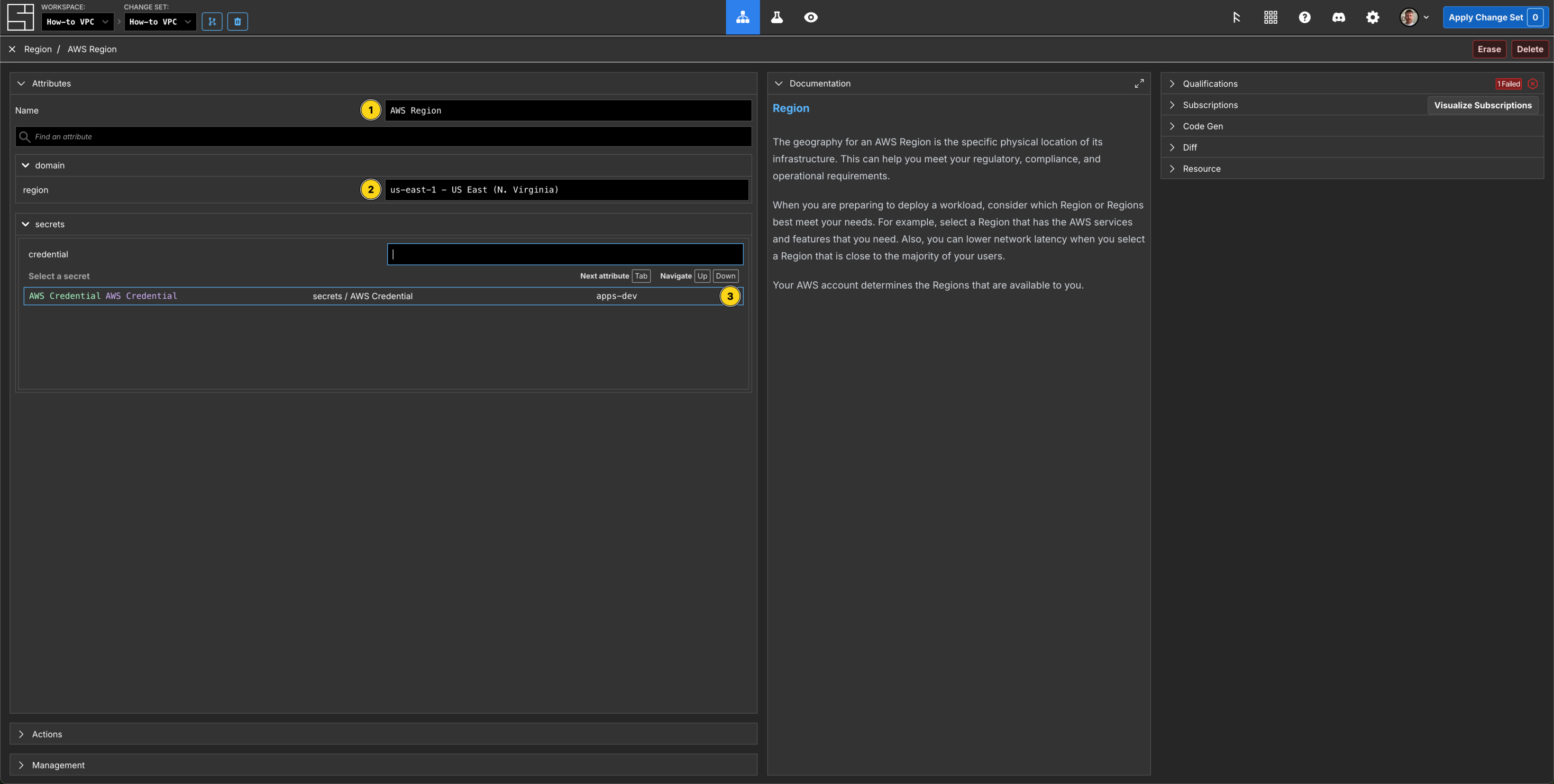
Create a VPC Component
$ cat > component.json <<'EOF'
{
  "schemaName": "AWS::EC2::VPC",
  "attributes": {
    "/si/name": "How to VPC",
    "/domain/CidrBlock": "10.0.0.0/16",
    "/domain/EnableDnsHostnames": true,
    "/domain/EnableDnsSupport": true,
    "/domain/extra/Region":    { "$source": { "component": "How to Region", "path": "/domain/region" } },
    "/secrets/AWS Credential": { "$source": { "component": "aws-credential-dev", "path": "/secrets/AWS Credential" } }
  }
}
EOF

$ si component create -c $SI_CHANGE_SET_ID component.json
✨ info    si              Loading component data from "component.json"
✨ info    si              Creating component: "AWS::EC2::VPC" "How to VPC"
Component ID: 01KCMZ57S8EQFQEKQMSRCWHSZY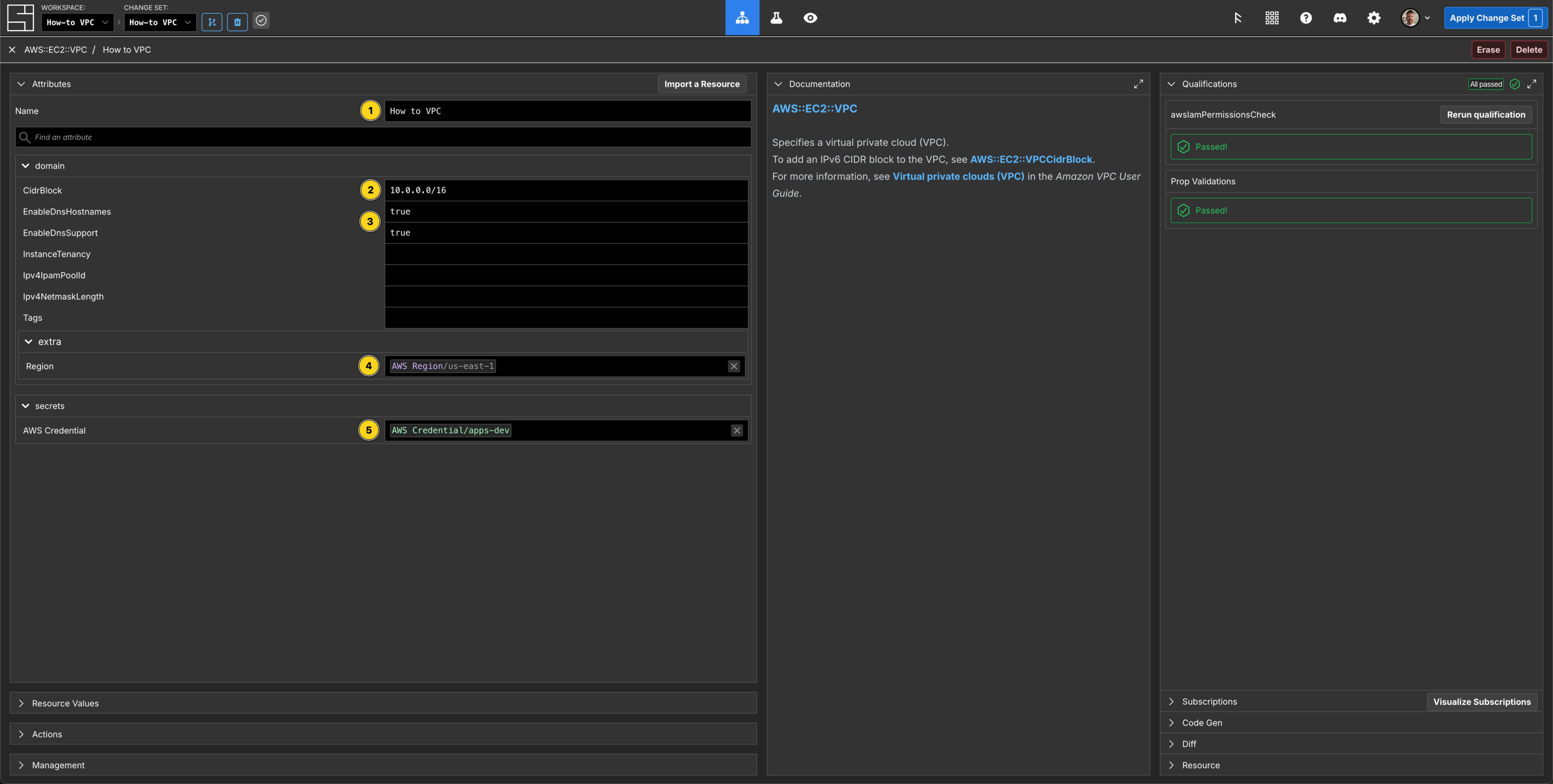
Create the Public Subnet Components
This VPC will span multiple availability zones in our AWS Region.
$ cat > component.json <<'EOF'
{
  "schemaName": "AWS::EC2::Subnet",
  "attributes": {
    "/si/name": "Public 1",
    "/domain/CidrBlock": "10.0.128.0/20",
    "/domain/AvailabilityZone": "us-east-1a",
    "/domain/MapPublicIpOnLaunch": true,
    "/domain/VpcId":           { "$source": { "component": "How to VPC",         "path": "/resource_value/VpcId"} },
    "/domain/extra/Region":    { "$source": { "component": "How to Region",      "path": "/domain/region" } },
    "/secrets/AWS Credential": { "$source": { "component": "aws-credential-dev", "path": "/secrets/AWS Credential" } }
  }
}
EOF

$ si component create -c $SI_CHANGE_SET_ID component.json
✨ info    si              Loading component data from "component.json"
✨ info    si              Creating component: "AWS::EC2::Subnet" "Public 1"
Component ID: 01KCMZKZSJP4MPTS5FFKCNWWEK$ cat > component.json <<'EOF'
{
"schemaName": "AWS::EC2::Subnet",
"attributes": {
"/si/name": "Public 2",
"/domain/CidrBlock": "10.0.144.0/20",
"/domain/AvailabilityZone": "us-east-1b",
"/domain/MapPublicIpOnLaunch": true,
"/domain/VpcId": { "$source": { "component": "How to VPC", "path": "/resource_value/VpcId"} },
"/domain/extra/Region": { "$source": { "component": "How to Region", "path": "/domain/region" } },
"/secrets/AWS Credential": { "$source": { "component": "aws-credential-dev", "path": "/secrets/AWS Credential" } }
}
}
EOF
$ si component create -c $SI_CHANGE_SET_ID component.json
✨ info si Loading component data from "component.json"
✨ info si Creating component: "AWS::EC2::Subnet" "Public 2"
Component ID: 01KCMZQVZJY5XQ82F82744CD94$ cat > component.json <<'EOF'
{
"schemaName": "AWS::EC2::Subnet",
"attributes": {
"/si/name": "Public 3",
"/domain/CidrBlock": "10.0.160.0/20",
"/domain/AvailabilityZone": "us-east-1c",
"/domain/MapPublicIpOnLaunch": true,
"/domain/VpcId": { "$source": { "component": "How to VPC", "path": "/resource_value/VpcId"} },
"/domain/extra/Region": { "$source": { "component": "How to Region", "path": "/domain/region" } },
"/secrets/AWS Credential": { "$source": { "component": "aws-credential-dev", "path": "/secrets/AWS Credential" } }
}
}
EOF
$ si component create -c $SI_CHANGE_SET_ID component.json
✨ info si Loading component data from "component.json"
✨ info si Creating component: "AWS::EC2::Subnet" "Public 3"
Component ID: 01KCMZS15RMPVZY2EA2TBEWGCD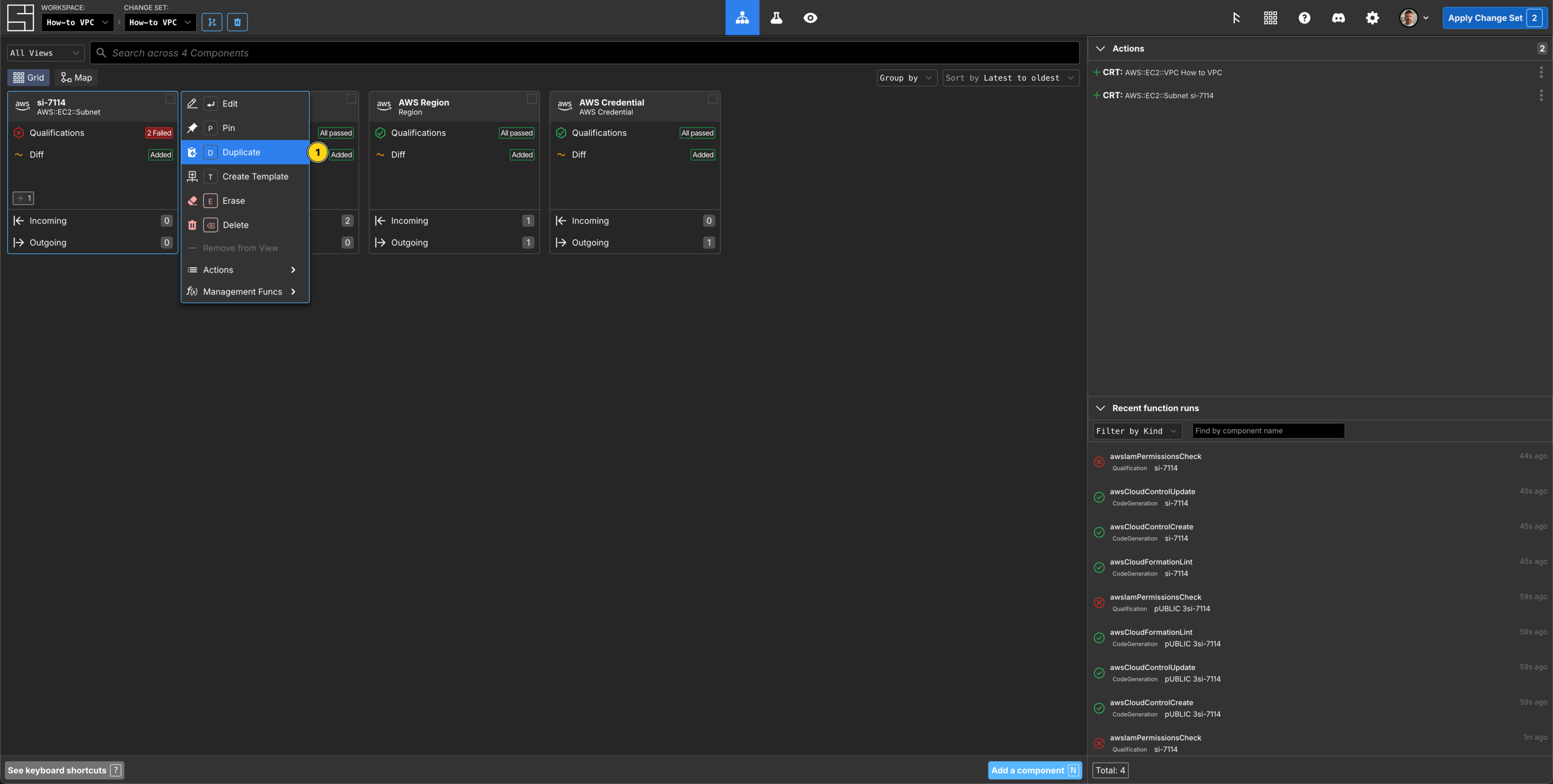
Create the Elastic IP Components
$ cat > component.json <<'EOF'
{
  "schemaName": "AWS::EC2::EIP",
  "attributes": {
    "/si/name": "NAT Gateway EIP 1",
    "/domain/Domain": "vpc",
    "/domain/extra/Region":    { "$source": { "component": "How to Region",      "path": "/domain/region" } },
    "/secrets/AWS Credential": { "$source": { "component": "aws-credential-dev", "path": "/secrets/AWS Credential" } }
  }
}
EOF

$ si component create -c $SI_CHANGE_SET_ID component.json
✨ info    si              Loading component data from "component.json"
✨ info    si              Creating component: "AWS::EC2::EIP" "NAT Gateway EIP 1"
Component ID: 01KCMZZDECDDJYKG6PWNSRV907$ cat > component.json <<'EOF'
{
"schemaName": "AWS::EC2::EIP",
"attributes": {
"/si/name": "NAT Gateway EIP 2",
"/domain/Domain": "vpc",
"/domain/extra/Region": { "$source": { "component": "How to Region", "path": "/domain/region" } },
"/secrets/AWS Credential": { "$source": { "component": "aws-credential-dev", "path": "/secrets/AWS Credential" } }
}
}
EOF
$ si component create -c $SI_CHANGE_SET_ID component.json
✨ info si Loading component data from "component.json"
✨ info si Creating component: "AWS::EC2::EIP" "NAT Gateway EIP 2"
Component ID: 01KCN00ZT2C68PGQXZ7A889WYQ$ cat > component.json <<'EOF'
{
"schemaName": "AWS::EC2::EIP",
"attributes": {
"/si/name": "NAT Gateway EIP 3",
"/domain/Domain": "vpc",
"/domain/extra/Region": { "$source": { "component": "How to Region", "path": "/domain/region" } },
"/secrets/AWS Credential": { "$source": { "component": "aws-credential-dev", "path": "/secrets/AWS Credential" } }
}
}
EOF
$ si component create -c $SI_CHANGE_SET_ID component.json
✨ info si Loading component data from "component.json"
✨ info si Creating component: "AWS::EC2::EIP" "NAT Gateway EIP 3"
Component ID: 01KCN01STSP85JM9Q63C81DNV2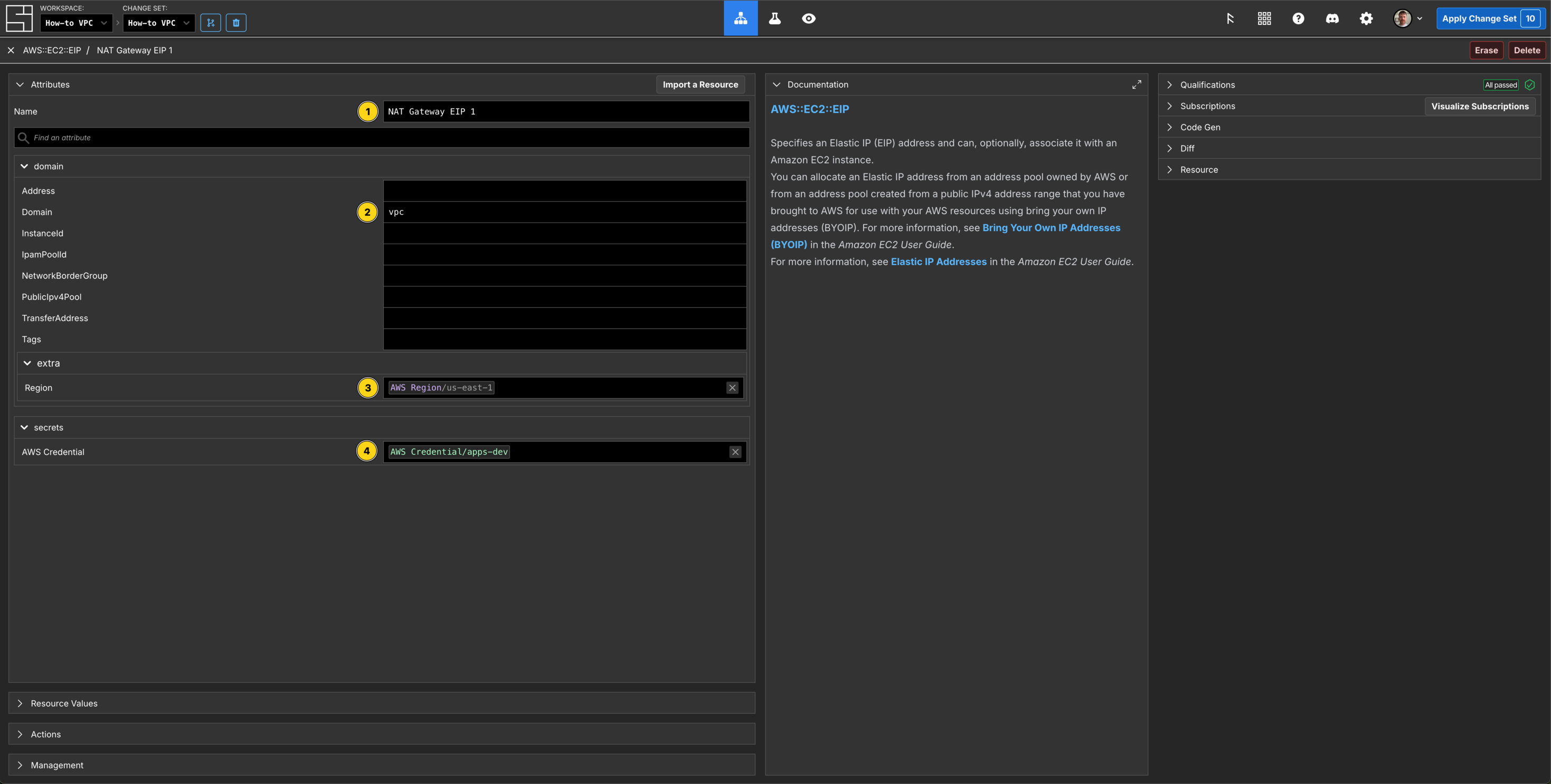
Create the NAT Gateway Components
$ cat > component.json <<'EOF'
{
  "schemaName": "AWS::EC2::NATGateway",
  "attributes": {
    "/si/name": "NAT Gateway 1",
    "/domain/ConnectivityType": "public",
    "/domain/SubnetId":        { "$source": { "component": "Public 1",           "path": "/resource_value/SubnetId" } },
    "/domain/AllocationId":    { "$source": { "component": "NAT Gateway EIP 1",  "path": "/resource_value/AllocationId" } },
    "/domain/extra/Region":    { "$source": { "component": "How to Region",      "path": "/domain/region" } },
    "/secrets/AWS Credential": { "$source": { "component": "aws-credential-dev", "path": "/secrets/AWS Credential" } }
  }
}
EOF

$ si component create -c $SI_CHANGE_SET_ID component.json
✨ info    si              Loading component data from "component.json"
✨ info    si              Creating component: "AWS::EC2::NATGateway" "NAT Gateway 1"
Component ID: 01KCN082A0E1CHMBWJHX3H7BS2$ cat > component.json <<'EOF'
{
"schemaName": "AWS::EC2::NATGateway",
"attributes": {
"/si/name": "NAT Gateway 2",
"/domain/ConnectivityType": "public",
"/domain/SubnetId": { "$source": { "component": "Public 2", "path": "/resource_value/SubnetId" } },
"/domain/AllocationId": { "$source": { "component": "NAT Gateway EIP 2", "path": "/resource_value/AllocationId" } },
"/domain/extra/Region": { "$source": { "component": "How to Region", "path": "/domain/region" } },
"/secrets/AWS Credential": { "$source": { "component": "aws-credential-dev", "path": "/secrets/AWS Credential" } }
}
}
EOF
$ si component create -c $SI_CHANGE_SET_ID component.json
✨ info si Loading component data from "component.json"
✨ info si Creating component: "AWS::EC2::NATGateway" "NAT Gateway 2"
Component ID: 01KCN0B1EZRAXS1PHXKC8TDE6Q$ cat > component.json <<'EOF'
{
"schemaName": "AWS::EC2::NATGateway",
"attributes": {
"/si/name": "NAT Gateway 3",
"/domain/ConnectivityType": "public",
"/domain/SubnetId": { "$source": { "component": "Public 3", "path": "/resource_value/SubnetId" } },
"/domain/AllocationId": { "$source": { "component": "NAT Gateway EIP 3", "path": "/resource_value/AllocationId" } },
"/domain/extra/Region": { "$source": { "component": "How to Region", "path": "/domain/region" } },
"/secrets/AWS Credential": { "$source": { "component": "aws-credential-dev", "path": "/secrets/AWS Credential" } }
}
}
EOF
$ si component create -c $SI_CHANGE_SET_ID component.json
✨ info si Loading component data from "component.json"
✨ info si Creating component: "AWS::EC2::NATGateway" "NAT Gateway 3"
Component ID: 01KCN0BNHJKENYF1AMM1CADQW5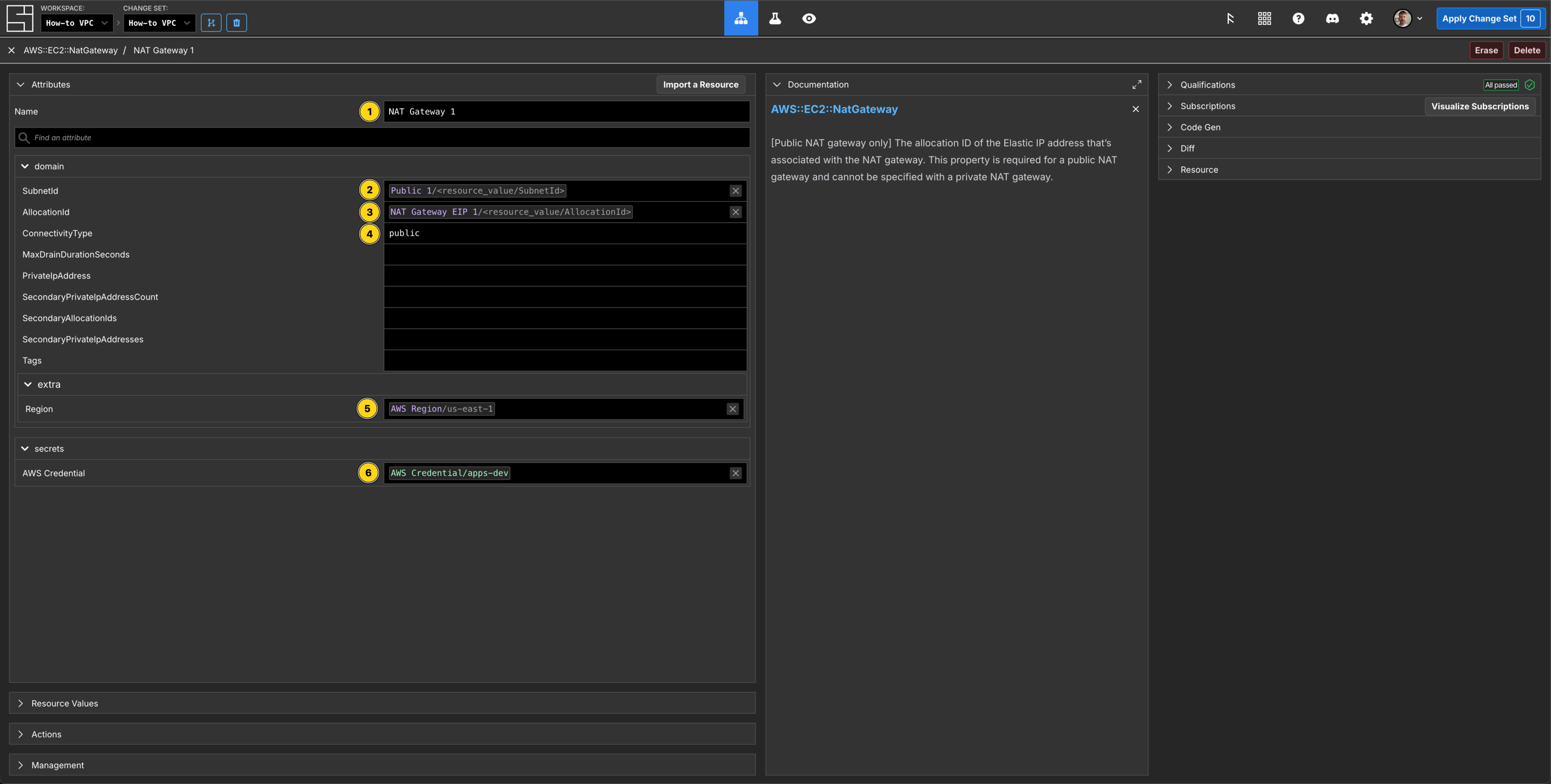
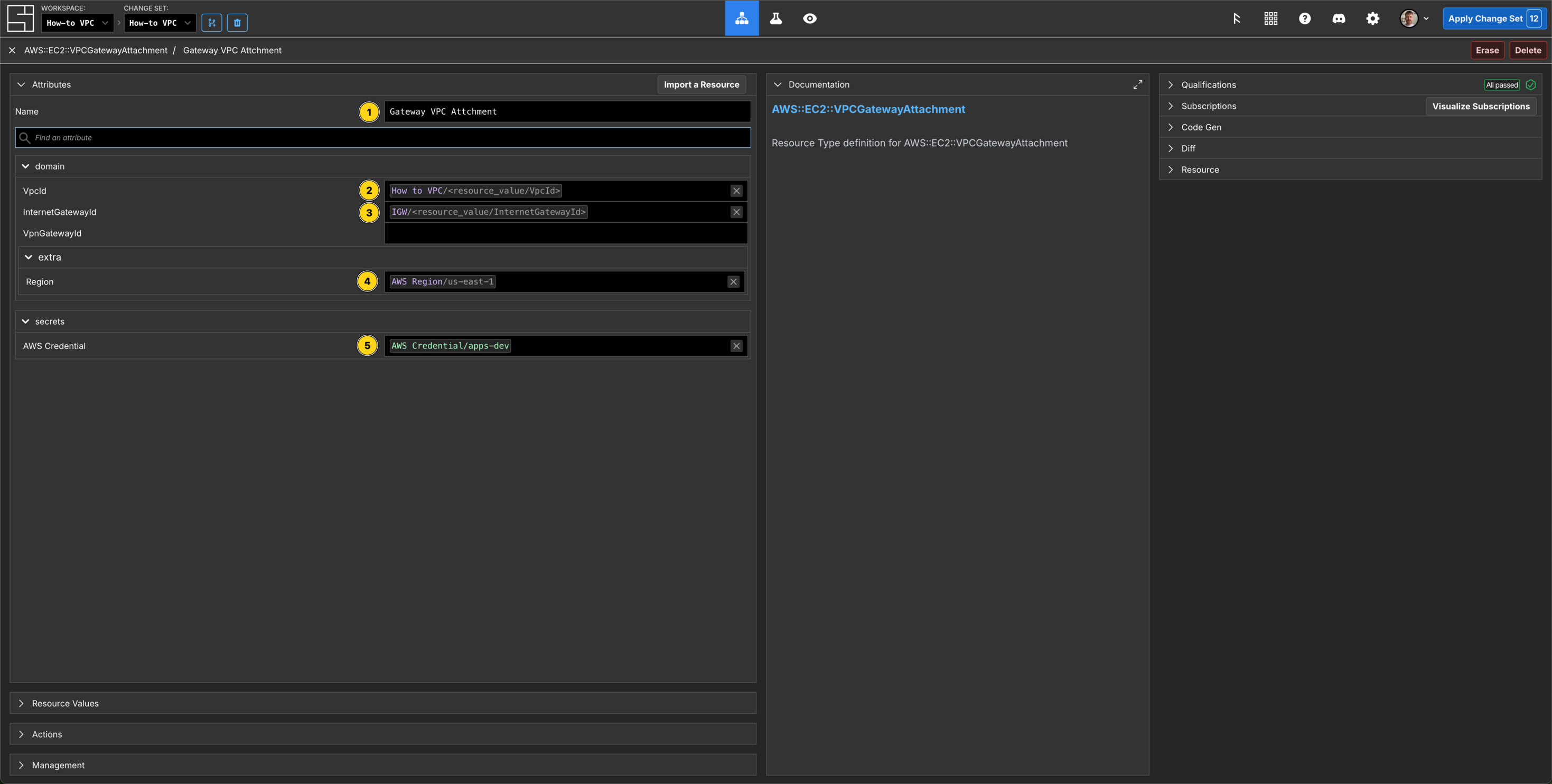
Create the Internet Gateway and VPCGatewayAttachment Components
$ cat > component.json <<'EOF'
{
  "schemaName": "AWS::EC2::InternetGateway",
  "attributes": {
    "/si/name": "IGW",
    "/domain/extra/Region":    { "$source": { "component": "How to Region",      "path": "/domain/region" } },
    "/secrets/AWS Credential": { "$source": { "component": "aws-credential-dev", "path": "/secrets/AWS Credential" } }
  }
}
EOF

$ si component create -c $SI_CHANGE_SET_ID component.json
✨ info    si              Loading component data from "component.json"
✨ info    si              Creating component: "AWS::EC2::InternetGateway" "IGW"
Component ID: 01KCN0G5T99658PK72FEY4HYTR$ cat > component.json <<'EOF'
{
"schemaName": "AWS::EC2::VPCGatewayAttachment",
"attributes": {
"/si/name": "Gateway VPC Attachment",
"/domain/InternetGatewayId": { "$source": { "component": "IGW", "path": "/resource_value/InternetGatewayId" } },
"/domain/VpcId": { "$source": { "component": "How to VPC", "path": "/resource_value/VpcId"} },
"/domain/extra/Region": { "$source": { "component": "How to Region", "path": "/domain/region" } },
"/secrets/AWS Credential": { "$source": { "component": "aws-credential-dev", "path": "/secrets/AWS Credential" } }
}
}
EOF
$ si component create -c $SI_CHANGE_SET_ID component.json
✨ info si Loading component data from "component.json"
✨ info si Creating component: "AWS::EC2::VPCGatewayAttachment" "Gateway VPC Attachment"
Component ID: 01KCN0KYR3F4KVS5DQSWEX8P8F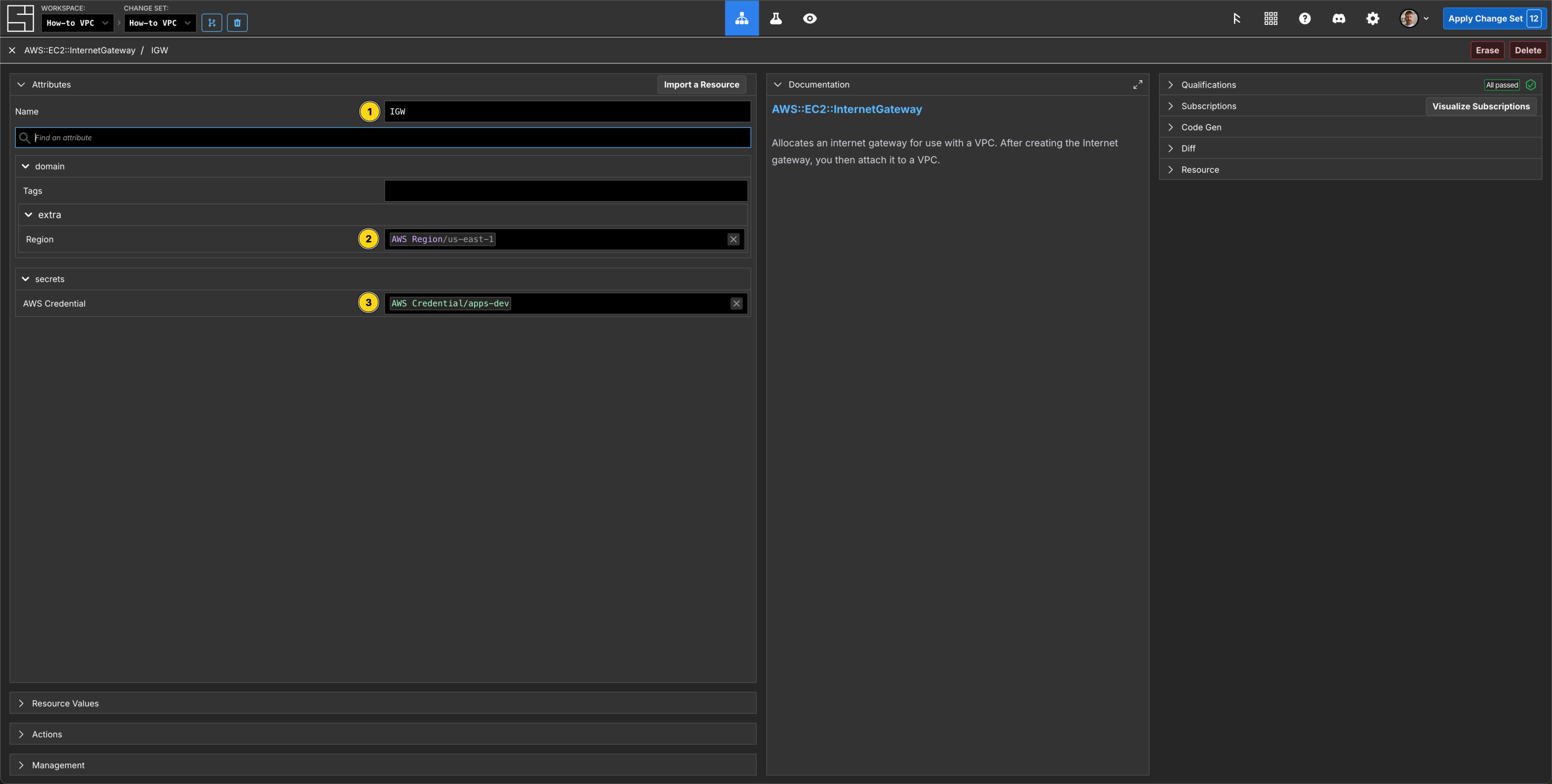
Create the Public Route Table and Subnet Route Table Association Components
$ cat > component.json <<'EOF'
{
  "schemaName": "AWS::EC2::RouteTable",
  "attributes": {
    "/si/name": "Public Route Table",
    "/domain/VpcId":           { "$source": { "component": "How to VPC",         "path": "/resource_value/VpcId"} },
    "/domain/extra/Region":    { "$source": { "component": "How to Region",      "path": "/domain/region" } },
    "/secrets/AWS Credential": { "$source": { "component": "aws-credential-dev", "path": "/secrets/AWS Credential" } }
  }
}
EOF

$ si component create -c $SI_CHANGE_SET_ID component.json
✨ info    si              Loading component data from "component.json"
✨ info    si              Creating component: "AWS::EC2::RouteTable" "Public Route Table"
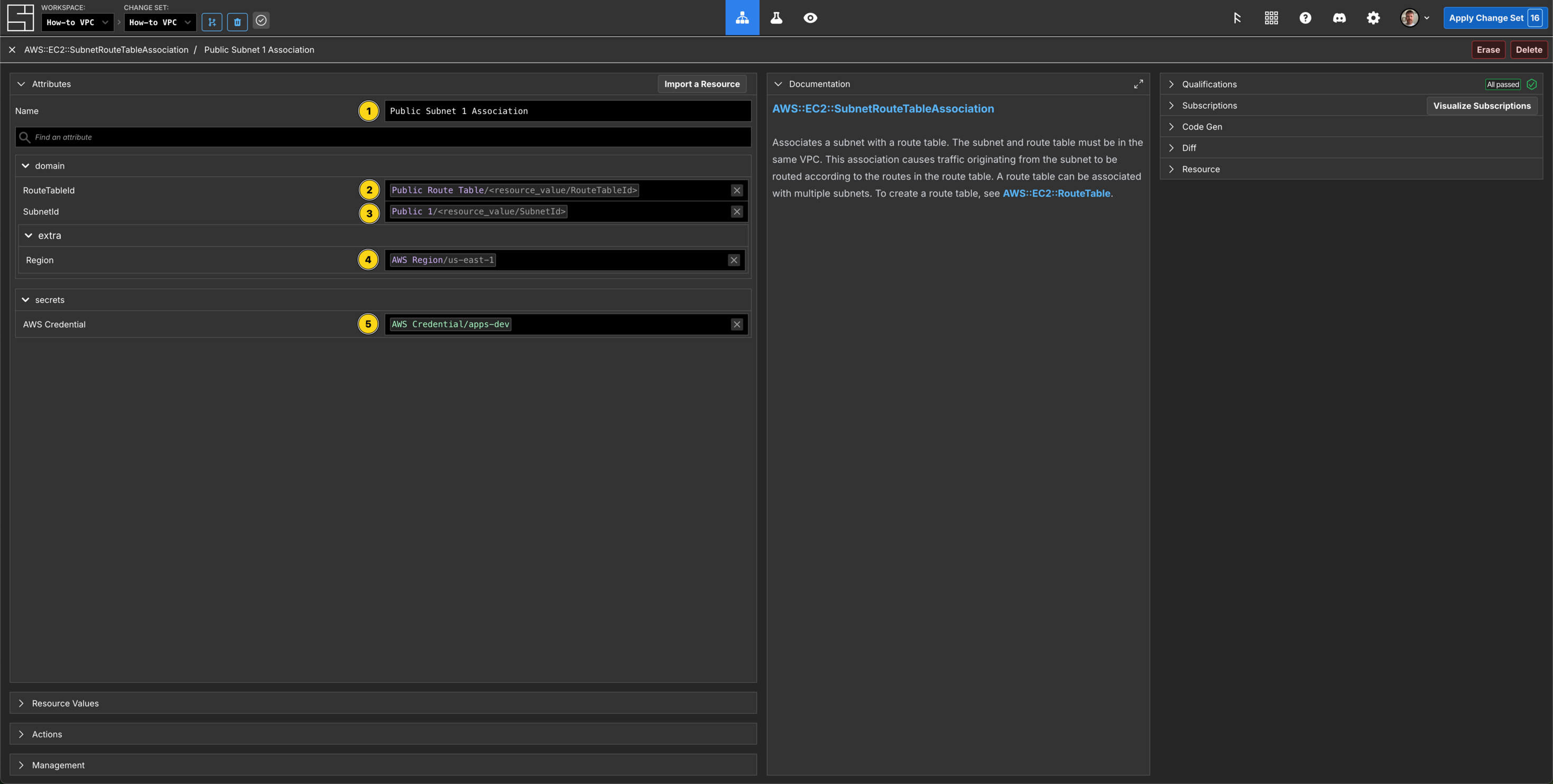
Component ID: 01KCN0RGPRYKNK4DWTVZHQYGDM$ cat > component.json <<'EOF'
{
"schemaName": "AWS::EC2::SubnetRouteTableAssociation",
"attributes": {
"/si/name": "Public Subnet 1 Association",
"/domain/RouteTableId": { "$source": { "component": "Public Route Table", "path": "/resource_value/RouteTableId" } },
"/domain/SubnetId": { "$source": { "component": "Public 1", "path": "/resource_value/SubnetId"} },
"/domain/extra/Region": { "$source": { "component": "How to Region", "path": "/domain/region" } },
"/secrets/AWS Credential": { "$source": { "component": "aws-credential-dev", "path": "/secrets/AWS Credential" } }
}
}
EOF
$ si component create -c $SI_CHANGE_SET_ID component.json
✨ info si Loading component data from "component.json"
✨ info si Creating component: "AWS::EC2::SubnetRouteTableAssociation" "Public Subnet 1 Association"
Component ID: 01KCN151EH2FRB6S350ZTCGM0V$ cat > component.json <<'EOF'
{
"schemaName": "AWS::EC2::SubnetRouteTableAssociation",
"attributes": {
"/si/name": "Public Subnet 2 Association",
"/domain/RouteTableId": { "$source": { "component": "Public Route Table", "path": "/resource_value/RouteTableId" } },
"/domain/SubnetId": { "$source": { "component": "Public 2", "path": "/resource_value/SubnetId"} },
"/domain/extra/Region": { "$source": { "component": "How to Region", "path": "/domain/region" } },
"/secrets/AWS Credential": { "$source": { "component": "aws-credential-dev", "path": "/secrets/AWS Credential" } }
}
}
EOF
$ si component create -c $SI_CHANGE_SET_ID component.json
✨ info si Loading component data from "component.json"
✨ info si Creating component: "AWS::EC2::SubnetRouteTableAssociation" "Public Subnet 2 Association"
Component ID: 01KCN171TQNGX4AA208RP8K1W9$ cat > component.json <<'EOF'
{
"schemaName": "AWS::EC2::SubnetRouteTableAssociation",
"attributes": {
"/si/name": "Public Subnet 3 Association",
"/domain/RouteTableId": { "$source": { "component": "Public Route Table", "path": "/resource_value/RouteTableId" } },
"/domain/SubnetId": { "$source": { "component": "Public 3", "path": "/resource_value/SubnetId"} },
"/domain/extra/Region": { "$source": { "component": "How to Region", "path": "/domain/region" } },
"/secrets/AWS Credential": { "$source": { "component": "aws-credential-dev", "path": "/secrets/AWS Credential" } }
}
}
EOF
$ si component create -c $SI_CHANGE_SET_ID component.json
✨ info si Loading component data from "component.json"
✨ info si Creating component: "AWS::EC2::SubnetRouteTableAssociation" "Public Subnet 3 Association"
Component ID: 01KCN17QS75GBQE4ZYDW6HJNG2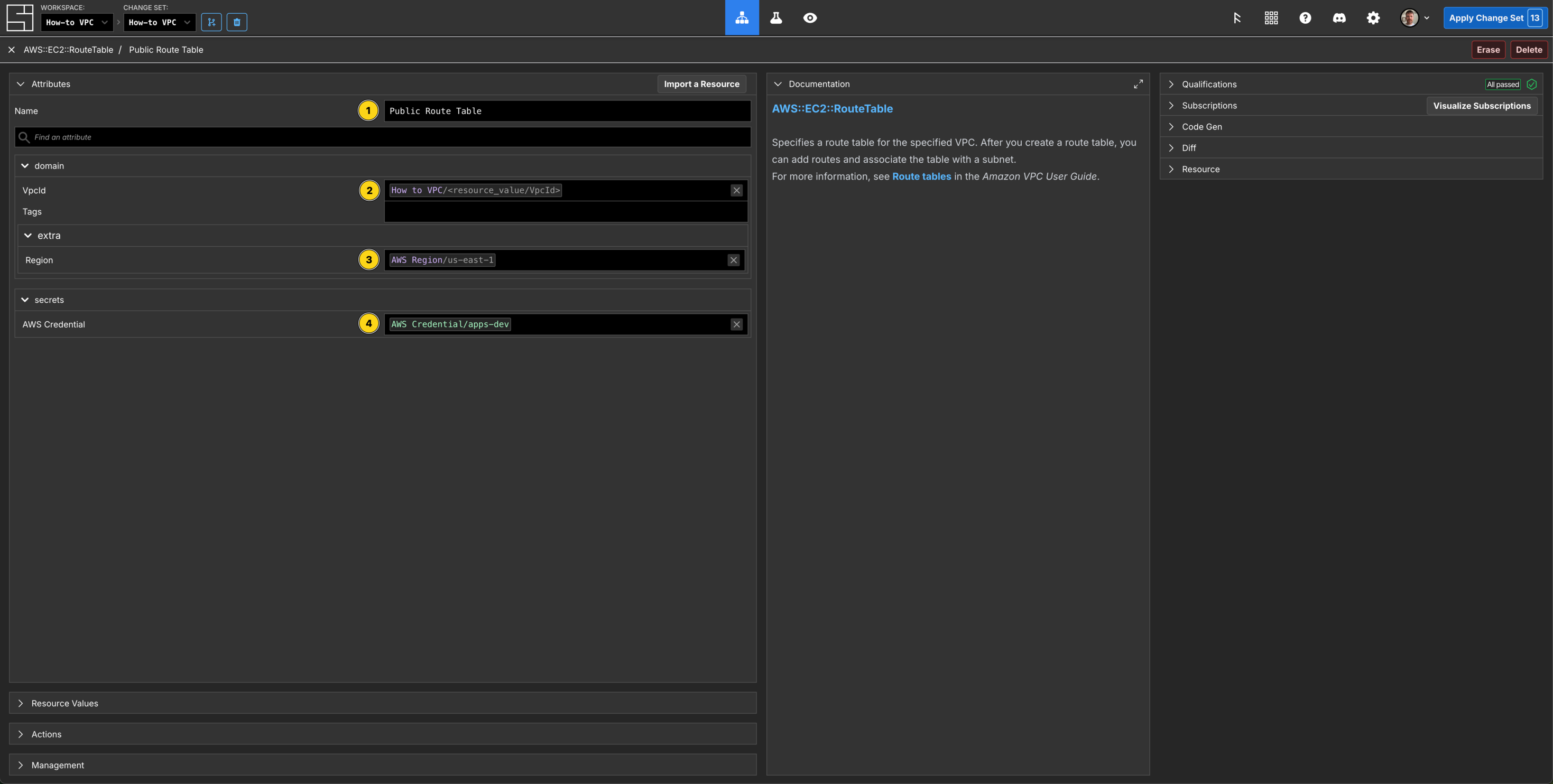
Create a Route Component
$ cat > component.json <<'EOF'
{
  "schemaName": "AWS::EC2::Route",
  "attributes": {
    "/si/name": "Route to Internet",
    "/domain/DestinationCidrBlock": "0.0.0.0/0",
    "/domain/RouteTableId":    { "$source": { "component": "Public Route Table", "path": "/resource_value/RouteTableId" } },
    "/domain/GatewayId":       { "$source": { "component": "IGW", "path": "/resource_value/InternetGatewayId" } },
    "/domain/extra/Region":    { "$source": { "component": "How to Region",      "path": "/domain/region" } },
    "/secrets/AWS Credential": { "$source": { "component": "aws-credential-dev", "path": "/secrets/AWS Credential" } }
  }
}
EOF

$ si component create -c $SI_CHANGE_SET_ID component.json
✨ info    si              Loading component data from "component.json"
✨ info    si              Creating component: "AWS::EC2::Route" "Route to Internet"
Component ID: 01KCN1FWCM6ADJ5831S2JWC9XP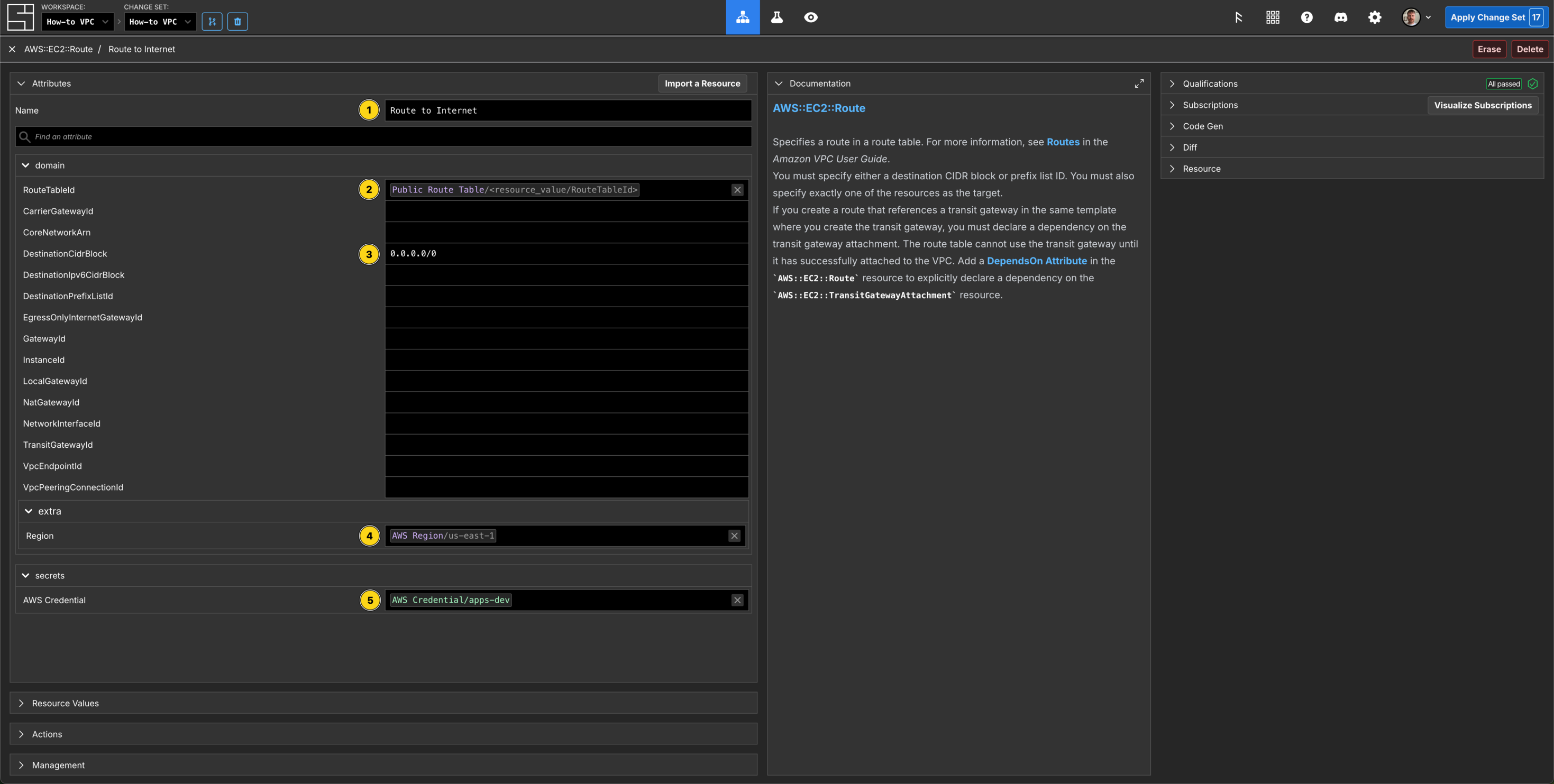
Current State of Play
Let's take a look at what we have in our Workspace so far.
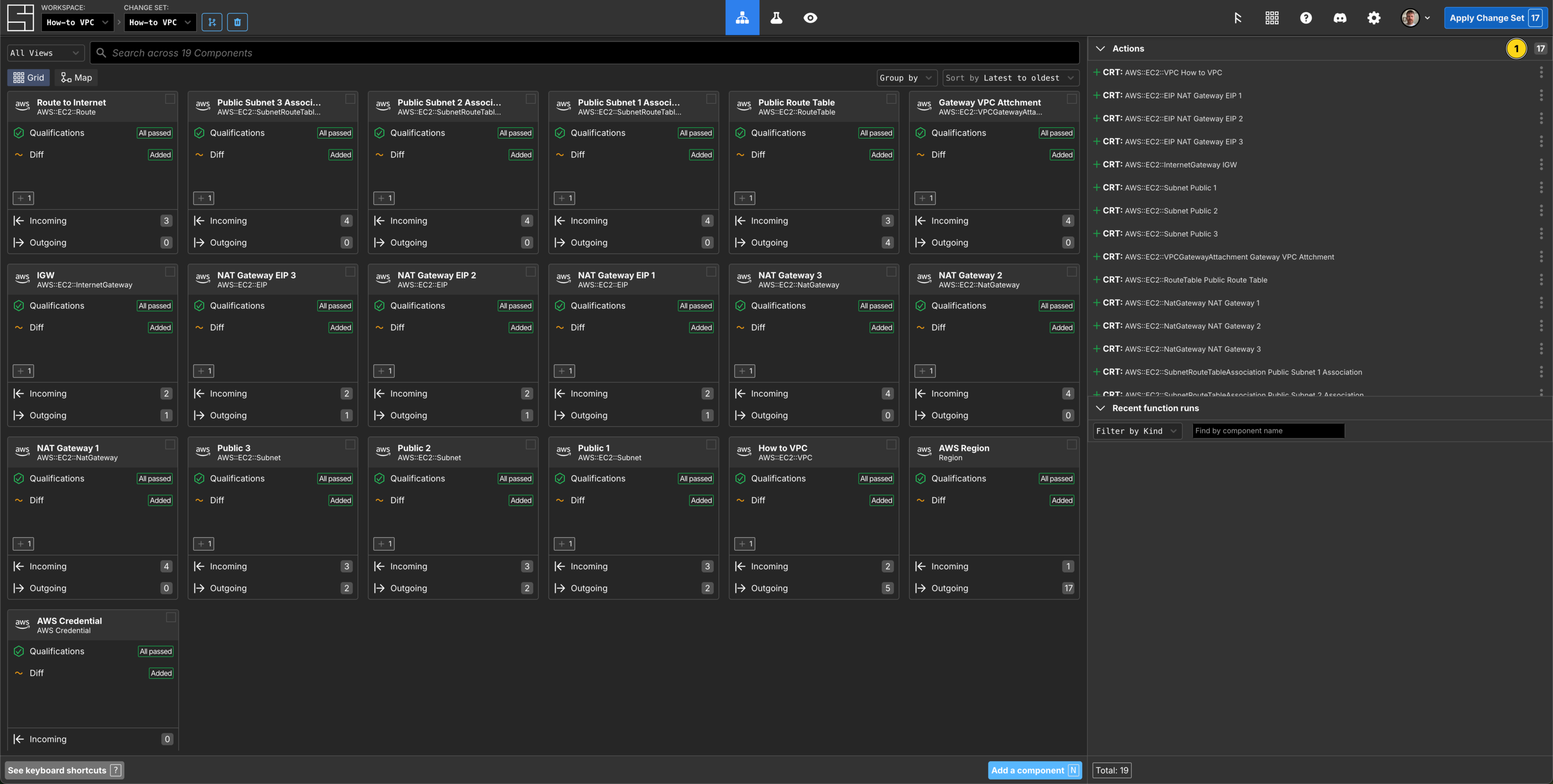
You can see all the components you have created so far in descending order. In the Actions panel on the right hand side you can see there are 17 Actions queued - these are all the real world resources that will be created once you apply your change set.
If you click the Map button in the top left of the Grid, you seen the visual relationship between the components are creating:
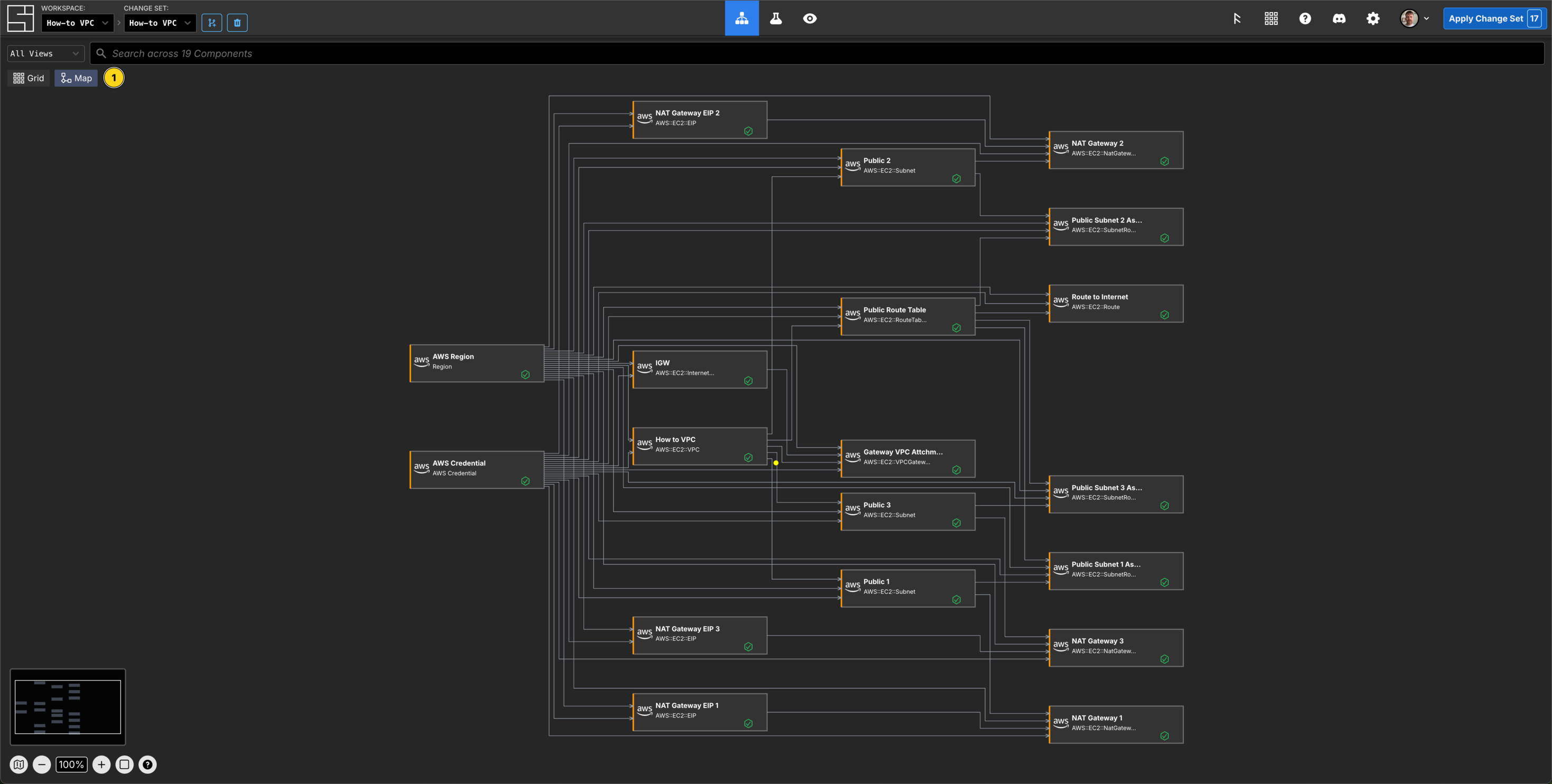
Where the Components are placed on this Map is determined by the dependant property Subscriptions.
Create the Private Subnet Components
$ cat > component.json <<'EOF'
{
  "schemaName": "AWS::EC2::Subnet",
  "attributes": {
    "/si/name": "Private 1",
    "/domain/CidrBlock": "10.0.0.0/19",
    "/domain/AvailabilityZone": "us-east-1a",
    "/domain/VpcId":           { "$source": { "component": "How to VPC",         "path": "/resource_value/VpcId"} },
    "/domain/extra/Region":    { "$source": { "component": "How to Region",      "path": "/domain/region" } },
    "/secrets/AWS Credential": { "$source": { "component": "aws-credential-dev", "path": "/secrets/AWS Credential" } }
  }
}
EOF

$ si component create -c $SI_CHANGE_SET_ID component.json
✨ info    si              Loading component data from "component.json"
✨ info    si              Creating component: "AWS::EC2::Subnet" "Private 1"
Component ID: 01KCN1P5DXA7XCQBQ9FDBKVRQC$ cat > component.json <<'EOF'
{
"schemaName": "AWS::EC2::Subnet",
"attributes": {
"/si/name": "Private 2",
"/domain/CidrBlock": "10.0.32.0/19",
"/domain/AvailabilityZone": "us-east-1b",
"/domain/VpcId": { "$source": { "component": "How to VPC", "path": "/resource_value/VpcId"} },
"/domain/extra/Region": { "$source": { "component": "How to Region", "path": "/domain/region" } },
"/secrets/AWS Credential": { "$source": { "component": "aws-credential-dev", "path": "/secrets/AWS Credential" } }
}
}
EOF
$ si component create -c $SI_CHANGE_SET_ID component.json
✨ info si Loading component data from "component.json"
✨ info si Creating component: "AWS::EC2::Subnet" "Private 2"
Component ID: 01KCN1RYT3YRNF2TSXY7NNKH4V$ cat > component.json <<'EOF'
{
"schemaName": "AWS::EC2::Subnet",
"attributes": {
"/si/name": "Private 3",
"/domain/CidrBlock": "10.0.64.0/19",
"/domain/AvailabilityZone": "us-east-1c",
"/domain/VpcId": { "$source": { "component": "How to VPC", "path": "/resource_value/VpcId"} },
"/domain/extra/Region": { "$source": { "component": "How to Region", "path": "/domain/region" } },
"/secrets/AWS Credential": { "$source": { "component": "aws-credential-dev", "path": "/secrets/AWS Credential" } }
}
}
EOF
$ si component create -c $SI_CHANGE_SET_ID component.json
✨ info si Loading component data from "component.json"
✨ info si Creating component: "AWS::EC2::Subnet" "Private 3"
Component ID: 01KCN1T5VXQ9XQGJBZ5YDNRXJW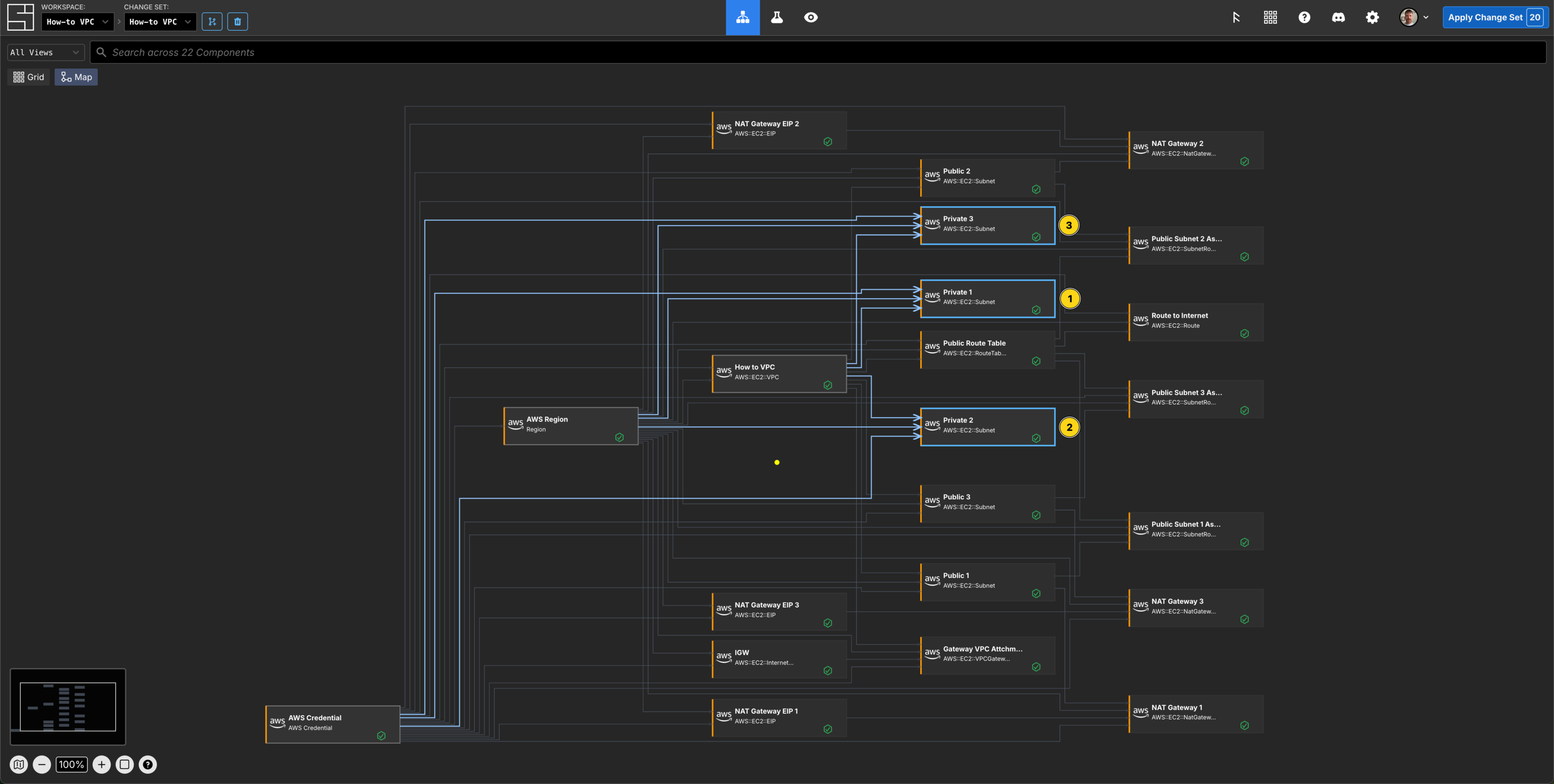
Create the Private Route Table Components
$ cat > component.json <<'EOF'
{
  "schemaName": "AWS::EC2::RouteTable",
  "attributes": {
    "/si/name": "Private Route Table 1",
    "/domain/VpcId":           { "$source": { "component": "How to VPC",         "path": "/resource_value/VpcId"} },
    "/domain/extra/Region":    { "$source": { "component": "How to Region",      "path": "/domain/region" } },
    "/secrets/AWS Credential": { "$source": { "component": "aws-credential-dev", "path": "/secrets/AWS Credential" } }
  }
}
EOF

$ si component create -c $SI_CHANGE_SET_ID component.json
✨ info    si              Loading component data from "component.json"
✨ info    si              Creating component: "AWS::EC2::RouteTable" "Private Route Table 1"
Component ID: 01KCN1W8GF5QVTPJKHNECZQCJ1$ cat > component.json <<'EOF'
{
"schemaName": "AWS::EC2::RouteTable",
"attributes": {
"/si/name": "Private Route Table 2",
"/domain/VpcId": { "$source": { "component": "How to VPC", "path": "/resource_value/VpcId"} },
"/domain/extra/Region": { "$source": { "component": "How to Region", "path": "/domain/region" } },
"/secrets/AWS Credential": { "$source": { "component": "aws-credential-dev", "path": "/secrets/AWS Credential" } }
}
}
EOF
$ si component create -c $SI_CHANGE_SET_ID component.json
✨ info si Loading component data from "component.json"
✨ info si Creating component: "AWS::EC2::RouteTable" "Private Route Table 2"
Component ID: 01KCN1XFHAKX6FR24RMZY3VCPR$ cat > component.json <<'EOF'
{
"schemaName": "AWS::EC2::RouteTable",
"attributes": {
"/si/name": "Private Route Table 3",
"/domain/VpcId": { "$source": { "component": "How to VPC", "path": "/resource_value/VpcId"} },
"/domain/extra/Region": { "$source": { "component": "How to Region", "path": "/domain/region" } },
"/secrets/AWS Credential": { "$source": { "component": "aws-credential-dev", "path": "/secrets/AWS Credential" } }
}
}
EOF
$ si component create -c $SI_CHANGE_SET_ID component.json
✨ info si Loading component data from "component.json"
✨ info si Creating component: "AWS::EC2::RouteTable" "Private Route Table 3"
Component ID: 01KCN1XXQD5258DXRX8RMC2F9C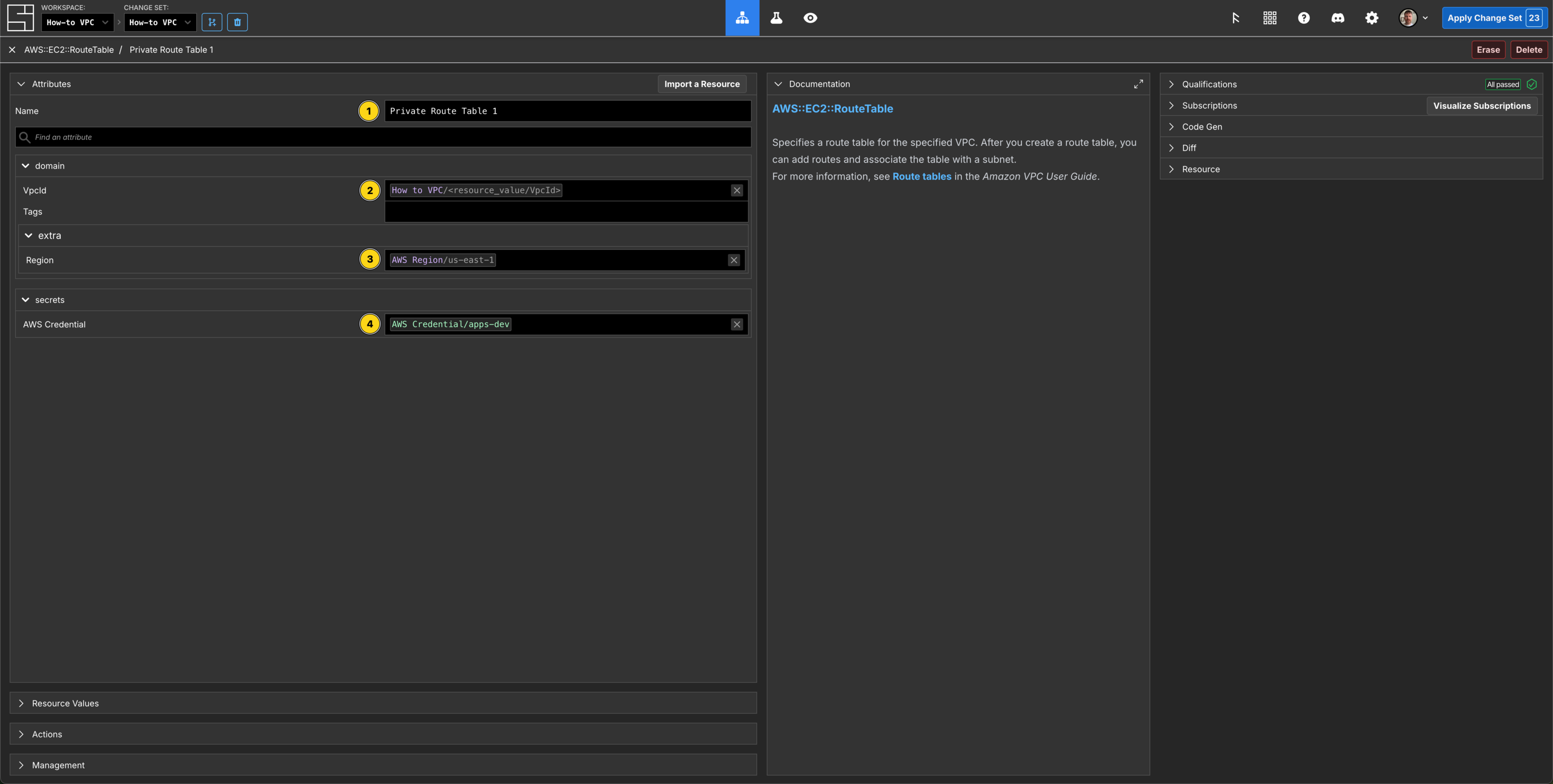
Create the Private Route Components
$ cat > component.json <<'EOF'
{
  "schemaName": "AWS::EC2::Route",
  "attributes": {
    "/si/name": "Route to Internet 1",
    "/domain/DestinationCidrBlock": "0.0.0.0/0",
    "/domain/RouteTableId":    { "$source": { "component": "Private Route Table 1", "path": "/resource_value/RouteTableId" } },
    "/domain/GatewayId":       { "$source": { "component": "NAT Gateway 1",         "path": "/resource_value/NatGatewayId" } },
    "/domain/extra/Region":    { "$source": { "component": "How to Region",         "path": "/domain/region" } },
    "/secrets/AWS Credential": { "$source": { "component": "aws-credential-dev",    "path": "/secrets/AWS Credential" } }
  }
}
EOF

$ si component create -c $SI_CHANGE_SET_ID component.json
✨ info    si              Loading component data from "component.json"
✨ info    si              Creating component: "AWS::EC2::Route" "Route to Internet 1"
Component ID: 01KCN27S6F5KP0D209W573FPW1$ cat > component.json <<'EOF'
{
"schemaName": "AWS::EC2::Route",
"attributes": {
"/si/name": "Route to Internet 2",
"/domain/DestinationCidrBlock": "0.0.0.0/0",
"/domain/RouteTableId": { "$source": { "component": "Private Route Table 2", "path": "/resource_value/RouteTableId" } },
"/domain/GatewayId": { "$source": { "component": "NAT Gateway 2", "path": "/resource_value/NatGatewayId" } },
"/domain/extra/Region": { "$source": { "component": "How to Region", "path": "/domain/region" } },
"/secrets/AWS Credential": { "$source": { "component": "aws-credential-dev", "path": "/secrets/AWS Credential" } }
}
}
EOF
$ si component create -c $SI_CHANGE_SET_ID component.json
✨ info si Loading component data from "component.json"
✨ info si Creating component: "AWS::EC2::Route" "Route to Internet 2"
Component ID: 01KCN299ATEQYFBK5WZ7VAX868$ cat > component.json <<'EOF'
{
"schemaName": "AWS::EC2::Route",
"attributes": {
"/si/name": "Route to Internet 3",
"/domain/DestinationCidrBlock": "0.0.0.0/0",
"/domain/RouteTableId": { "$source": { "component": "Private Route Table 3", "path": "/resource_value/RouteTableId" } },
"/domain/GatewayId": { "$source": { "component": "NAT Gateway 3", "path": "/resource_value/NatGatewayId" } },
"/domain/extra/Region": { "$source": { "component": "How to Region", "path": "/domain/region" } },
"/secrets/AWS Credential": { "$source": { "component": "aws-credential-dev", "path": "/secrets/AWS Credential" } }
}
}
EOF
$ si component create -c $SI_CHANGE_SET_ID component.json
✨ info si Loading component data from "component.json"
✨ info si Creating component: "AWS::EC2::Route" "Route to Internet 3"
Component ID: 01KCN29XRRA7Y408958NMSGWWH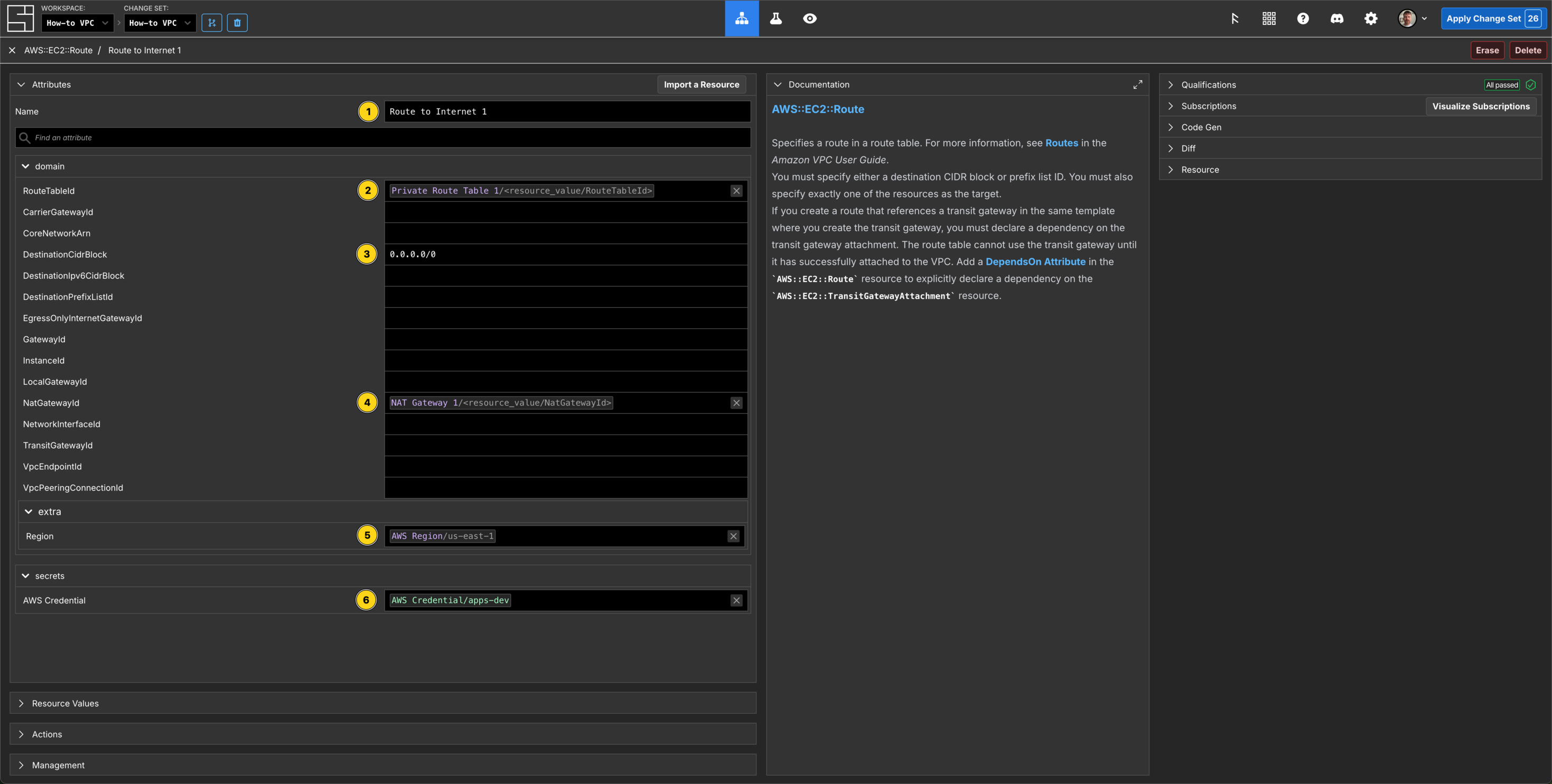
Create the Private Subnet Route Table Associations
$ cat > component.json <<'EOF'
{
  "schemaName": "AWS::EC2::SubnetRouteTableAssociation",
  "attributes": {
    "/si/name": "Private 1 Association",
    "/domain/RouteTableId":    { "$source": { "component": "Private Route Table 1", "path": "/resource_value/RouteTableId" } },
    "/domain/SubnetId":        { "$source": { "component": "Private 1",           "path": "/resource_value/SubnetId"} },
    "/domain/extra/Region":    { "$source": { "component": "How to Region",      "path": "/domain/region" } },
    "/secrets/AWS Credential": { "$source": { "component": "aws-credential-dev", "path": "/secrets/AWS Credential" } }
  }
}
EOF

$ si component create -c $SI_CHANGE_SET_ID component.json
✨ info    si              Loading component data from "component.json"
✨ info    si              Creating component: "AWS::EC2::SubnetRouteTableAssociation" "Private 1 Association"
Component ID: 01KCN2ATJ6X55YW2AXH909NH69$ cat > component.json <<'EOF'
{
"schemaName": "AWS::EC2::SubnetRouteTableAssociation",
"attributes": {
"/si/name": "Private 2 Association",
"/domain/RouteTableId": { "$source": { "component": "Private Route Table 2", "path": "/resource_value/RouteTableId" } },
"/domain/SubnetId": { "$source": { "component": "Private 2", "path": "/resource_value/SubnetId"} },
"/domain/extra/Region": { "$source": { "component": "How to Region", "path": "/domain/region" } },
"/secrets/AWS Credential": { "$source": { "component": "aws-credential-dev", "path": "/secrets/AWS Credential" } }
}
}
EOF
$ si component create -c $SI_CHANGE_SET_ID component.json
✨ info si Loading component data from "component.json"
✨ info si Creating component: "AWS::EC2::SubnetRouteTableAssociation" "Private 2 Association"
Component ID: 01KCN2CP5BMMPBBHB33V8GB7T8$ cat > component.json <<'EOF'
{
"schemaName": "AWS::EC2::SubnetRouteTableAssociation",
"attributes": {
"/si/name": "Private 3 Association",
"/domain/RouteTableId": { "$source": { "component": "Private Route Table 3", "path": "/resource_value/RouteTableId" } },
"/domain/SubnetId": { "$source": { "component": "Private 3", "path": "/resource_value/SubnetId"} },
"/domain/extra/Region": { "$source": { "component": "How to Region", "path": "/domain/region" } },
"/secrets/AWS Credential": { "$source": { "component": "aws-credential-dev", "path": "/secrets/AWS Credential" } }
}
}
EOF
$ si component create -c $SI_CHANGE_SET_ID component.json
✨ info si Loading component data from "component.json"
✨ info si Creating component: "AWS::EC2::SubnetRouteTableAssociation" "Private 3 Association"
Component ID: 01KCN2D4F9SVZR0SSR9E7EMANP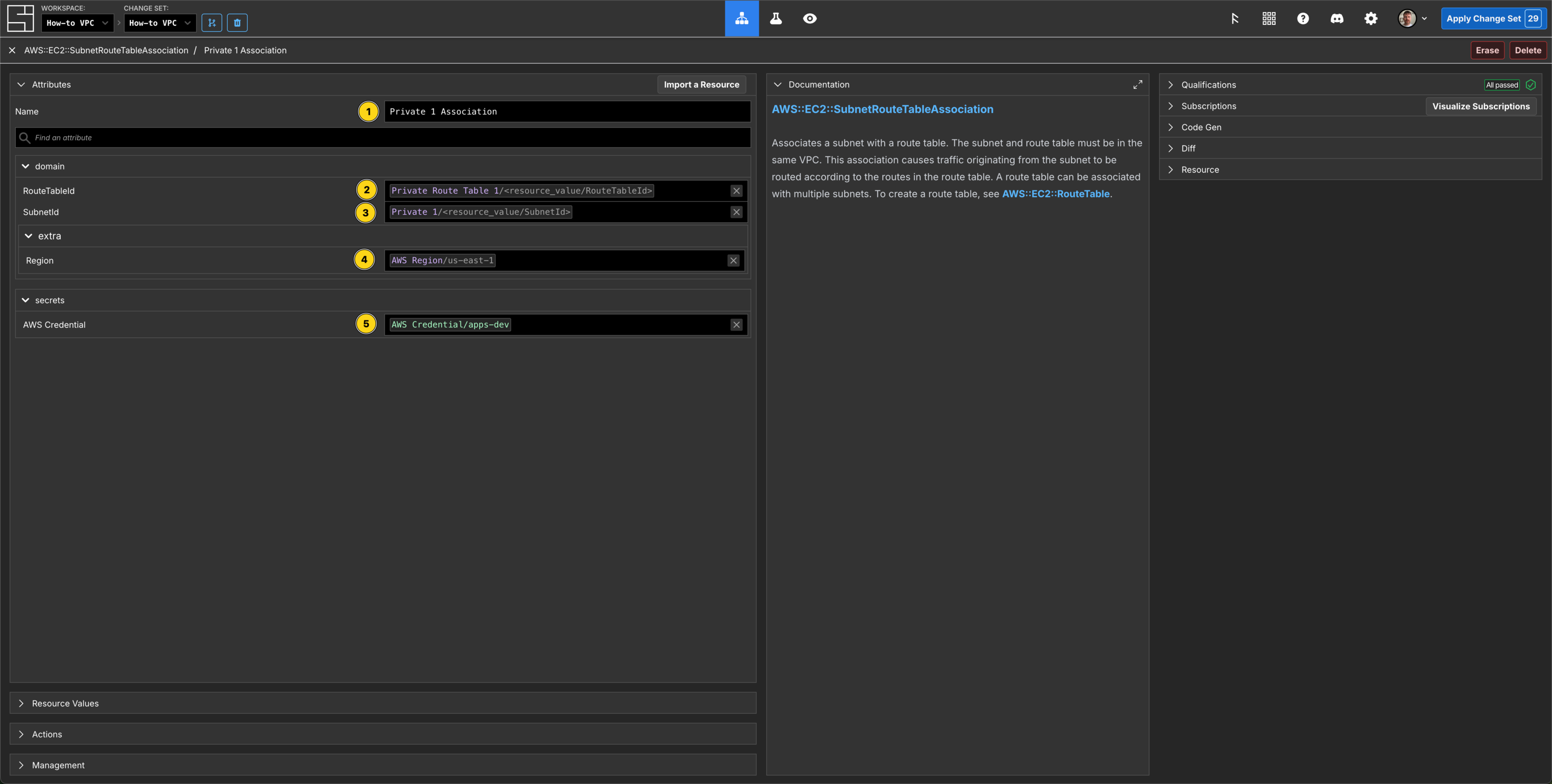
Apply your Change Set
Now you can see a scrollable list of 29 pending Create Actions, and all of the individual Components on the Grid required for you to create your How to VPC!
You can also view the Map to see all of your Components:
$ si change-set apply $SI_CHANGE_SET_ID
✨ info    si              Gathering change set data...
✨ info    si              Applying change set...
✨ info    si              Change set applied successfully: { id: "01KCMGWWD388NJ2DH6KQPXYEG8", name: "How-to VPC", status: "Applied" }
✔ Executing 29 action(s):
✨ info    si              All actions completed successfully!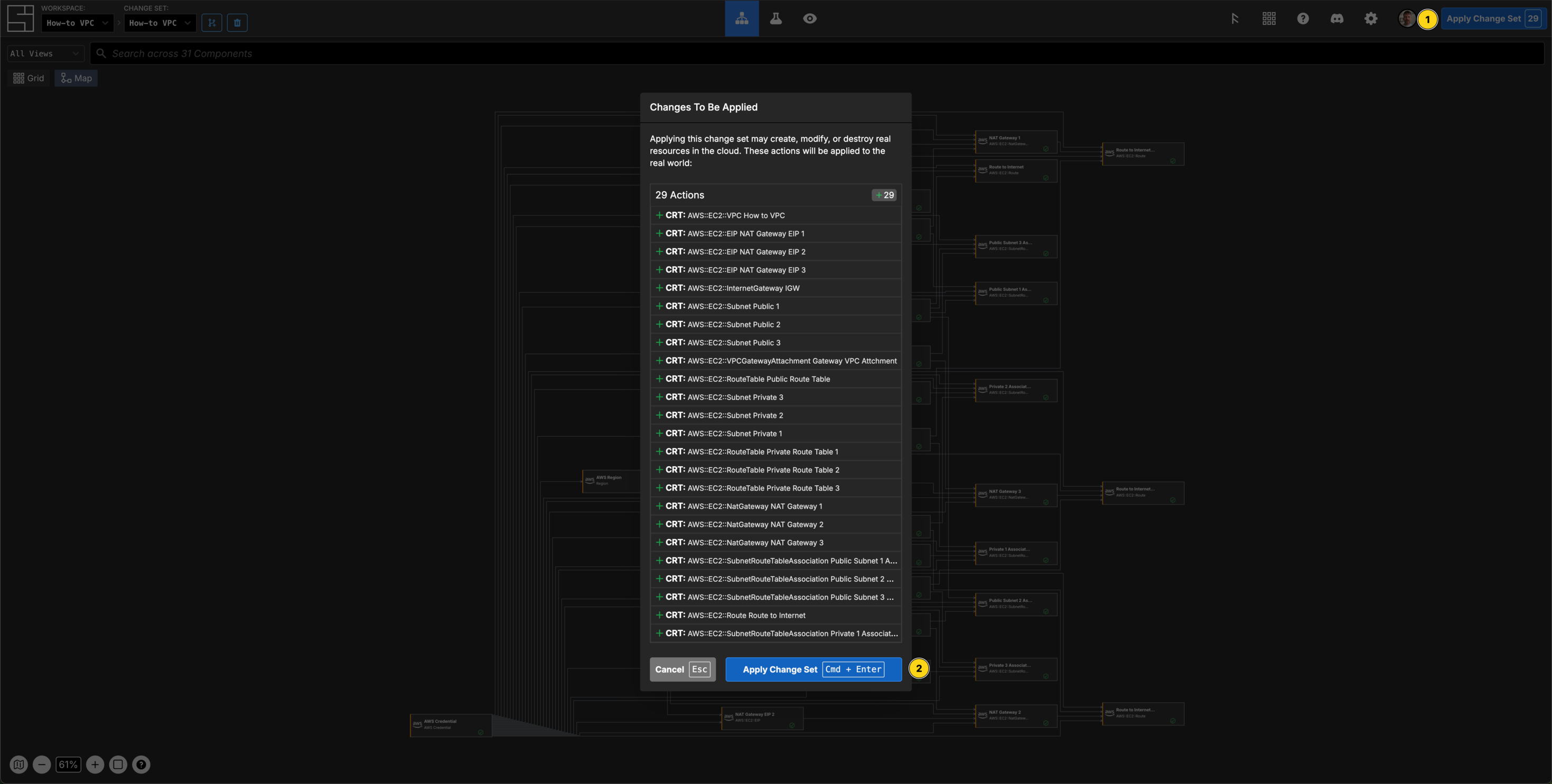
Explore your resources
You can review the completed AWS resources by clicking into your Components and viewing the Resource sub-panel for each of your new resources.
Clean Up
$ si change-set create "Clean up VPC How-to"
✨ info    si              Change set created: { id: "01KCPYKKKS3030CZM2XZV579CS", name: "Clean up VPC How-to", status: "Open" }
$ export SI_CHANGE_SET_ID=01KCPYKKKS3030CZM2XZV579CS$ si component delete -c $SI_CHANGE_SET_ID "How to VPC"
✨ info si Deleting component: "How to VPC"
✨ info si Successfully deleted component: "How to VPC" ("01KCMZ57S8EQFQEKQMSRCWHSZY")
$ si component delete -c $SI_CHANGE_SET_ID "NAT Gateway EIP 1"
✨ info si Deleting component: "NAT Gateway EIP 1"
✨ info si Successfully deleted component: "NAT Gateway EIP 1" ("01KCMZZDECDDJYKG6PWNSRV907")
$ si component delete -c $SI_CHANGE_SET_ID "NAT Gateway EIP 2"
✨ info si Deleting component: "NAT Gateway EIP 2"
✨ info si Successfully deleted component: "NAT Gateway EIP 2" ("01KCN00ZT2C68PGQXZ7A889WYQ")
$ si component delete -c $SI_CHANGE_SET_ID "NAT Gateway EIP 3"
✨ info si Deleting component: "NAT Gateway EIP 3"
✨ info si Successfully deleted component: "NAT Gateway EIP 3" ("01KCN01STSP85JM9Q63C81DNV2")
$ si component delete -c $SI_CHANGE_SET_ID "IGW"
✨ info si Deleting component: "IGW"
✨ info si Successfully deleted component: "IGW" ("01KCN0G5T99658PK72FEY4HYTR")
$ si component delete -c $SI_CHANGE_SET_ID "Public 1"
✨ info si Deleting component: "Public 1"
✨ info si Successfully deleted component: "Public 1" ("01KCMZKZSJP4MPTS5FFKCNWWEK")
$ si component delete -c $SI_CHANGE_SET_ID "Public 2"
✨ info si Deleting component: "Public 2"
✨ info si Successfully deleted component: "Public 2" ("01KCMZQVZJY5XQ82F82744CD94")
$ si component delete -c $SI_CHANGE_SET_ID "Public 3"
✨ info si Deleting component: "Public 3"
✨ info si Successfully deleted component: "Public 3" ("01KCMZS15RMPVZY2EA2TBEWGCD")
$ si component delete -c $SI_CHANGE_SET_ID "Gateway VPC Attachment"
✨ info si Deleting component: "Gateway VPC Attachment"
✨ info si Successfully deleted component: "Gateway VPC Attachment" ("01KCN0KYR3F4KVS5DQSWEX8P8F")
$ si component delete -c $SI_CHANGE_SET_ID "Public Route Table"
✨ info si Deleting component: "Public Route Table"
✨ info si Successfully deleted component: "Public Route Table" ("01KCN0RGPRYKNK4DWTVZHQYGDM")
$ si component delete -c $SI_CHANGE_SET_ID "Private 1"
✨ info si Deleting component: "Private 1"
✨ info si Successfully deleted component: "Private 1" ("01KCN1P5DXA7XCQBQ9FDBKVRQC")
$ si component delete -c $SI_CHANGE_SET_ID "Private 2"
✨ info si Deleting component: "Private 2"
✨ info si Successfully deleted component: "Private 2" ("01KCN1RYT3YRNF2TSXY7NNKH4V")
$ si component delete -c $SI_CHANGE_SET_ID "Private 3"
✨ info si Deleting component: "Private 3"
✨ info si Successfully deleted component: "Private 3" ("01KCN1T5VXQ9XQGJBZ5YDNRXJW")
$ si component delete -c $SI_CHANGE_SET_ID "Private Route Table 1"
✨ info si Deleting component: "Private Route Table 1"
✨ info si Successfully deleted component: "Private Route Table 1" ("01KCN1W8GF5QVTPJKHNECZQCJ1")
$ si component delete -c $SI_CHANGE_SET_ID "Private Route Table 2"
✨ info si Deleting component: "Private Route Table 2"
✨ info si Successfully deleted component: "Private Route Table 2" ("01KCN1XFHAKX6FR24RMZY3VCPR")
$ si component delete -c $SI_CHANGE_SET_ID "Private Route Table 3"
✨ info si Deleting component: "Private Route Table 3"
✨ info si Successfully deleted component: "Private Route Table 3" ("01KCN1XXQD5258DXRX8RMC2F9C")
$ si component delete -c $SI_CHANGE_SET_ID "NAT Gateway 1"
✨ info si Deleting component: "NAT Gateway 1"
✨ info si Successfully deleted component: "NAT Gateway 1" ("01KCN082A0E1CHMBWJHX3H7BS2")
$ si component delete -c $SI_CHANGE_SET_ID "NAT Gateway 2"
✨ info si Deleting component: "NAT Gateway 2"
✨ info si Successfully deleted component: "NAT Gateway 2" ("01KCN0B1EZRAXS1PHXKC8TDE6Q")
$ si component delete -c $SI_CHANGE_SET_ID "NAT Gateway 3"
✨ info si Deleting component: "NAT Gateway 3"
✨ info si Successfully deleted component: "NAT Gateway 3" ("01KCN0BNHJKENYF1AMM1CADQW5")
$ si component delete -c $SI_CHANGE_SET_ID "Public Subnet 1 Association"
✨ info si Deleting component: "Public Subnet 1 Association"
✨ info si Successfully deleted component: "Public Subnet 1 Association" ("01KCN151EH2FRB6S350ZTCGM0V")
$ si component delete -c $SI_CHANGE_SET_ID "Public Subnet 2 Association"
✨ info si Deleting component: "Public Subnet 2 Association"
✨ info si Successfully deleted component: "Public Subnet 2 Association" ("01KCN171TQNGX4AA208RP8K1W9")
$ si component delete -c $SI_CHANGE_SET_ID "Public Subnet 3 Association"
✨ info si Deleting component: "Public Subnet 3 Association"
✨ info si Successfully deleted component: "Public Subnet 3 Association" ("01KCN17QS75GBQE4ZYDW6HJNG2")
$ si component delete -c $SI_CHANGE_SET_ID "Route to Internet"
✨ info si Deleting component: "Route to Internet"
✨ info si Successfully deleted component: "Route to Internet" ("01KCN1FWCM6ADJ5831S2JWC9XP")
$ si component delete -c $SI_CHANGE_SET_ID "Private 1 Association"
✨ info si Deleting component: "Private 1 Association"
✨ info si Successfully deleted component: "Private 1 Association" ("01KCN2ATJ6X55YW2AXH909NH69")
$ si component delete -c $SI_CHANGE_SET_ID "Private 2 Association"
✨ info si Deleting component: "Private 2 Association"
✨ info si Successfully deleted component: "Private 2 Association" ("01KCN2CP5BMMPBBHB33V8GB7T8")
$ si component delete -c $SI_CHANGE_SET_ID "Private 3 Association"
✨ info si Deleting component: "Private 3 Association"
✨ info si Successfully deleted component: "Private 3 Association" ("01KCN2D4F9SVZR0SSR9E7EMANP")
$ si component delete -c $SI_CHANGE_SET_ID "Route to Internet 1"
✨ info si Deleting component: "Route to Internet 1"
✨ info si Successfully deleted component: "Route to Internet 1" ("01KCN27S6F5KP0D209W573FPW1")
$ si component delete -c $SI_CHANGE_SET_ID "Route to Internet 2"
✨ info si Deleting component: "Route to Internet 2"
✨ info si Successfully deleted component: "Route to Internet 2" ("01KCN299ATEQYFBK5WZ7VAX868")
$ si component delete -c $SI_CHANGE_SET_ID "Route to Internet 3"
✨ info si Deleting component: "Route to Internet 3"
✨ info si Successfully deleted component: "Route to Internet 3" ("01KCN29XRRA7Y408958NMSGWWH")$ si change-set apply $SI_CHANGE_SET_ID
✨ info si Gathering change set data...
✨ info si Applying change set...
✨ info si Change set applied successfully: { id: "01KCPYKKKS3030CZM2XZV579CS", name: "Clean up VPC How-to", status: "Applied" }
✔ Executing 29 action(s):
✨ info si All actions completed successfully!All your new resources should be deleted from your AWS account.